Discover the Helpful Features in C# 11: A Comprehensive Guide

No Comments »

If you’re a developer looking to enhance your programming skills, exploring the features in C# 11 is a must. This comprehensive guide will take you through the various helpful features that C# 11 offers, and how they can help improve your code efficiency and productivity.

C# 11 is the latest version of the C# programming language, and it comes packed with a host of new features that can make your coding experience all the more seamless. From pattern matching enhancements to improved performance with records, C# 11 has something to offer for every developer, regardless of their coding expertise.
Simplified Nullability Checking with Nullable Reference Types

With the introduction of C# 11, nullable reference types allow developers to enable warnings and errors for null reference exceptions during compilation. This feature helps catch null-related bugs early on, ensuring code safety and stability.

Developers can easily opt-in to this feature by adding a question mark after the variable name to indicate that it can be null. This simple addition enables developers to write more efficient and safe code. The nullable reference types feature is especially beneficial in large codebases, where null reference exceptions can lead to hard-to-find bugs. By promoting null safety and readability, this feature improves overall code quality.

With simplified nullability checking and nullable reference types, C# 11 empowers developers to write safe and stable code with ease. By leveraging this feature, developers can avoid frustrating bugs and improve their programming skills.

Improved Performance with Records

One of the most significant additions in C# 11 is the introduction of records. Records are immutable reference types that provide an efficient way to create objects. They are similar to classes, but with a focus on data transfer and storage.

Records can significantly improve performance by reducing the number of memory allocations required within an application. Since records are immutable, memory allocation only occurs when the record is first created. Any subsequent changes to the record are done by creating a new record that shares most of its data with the original, reducing the number of memory allocations and improving the application’s performance.

Another way records improve performance is through their support of structural equality. Since records are immutable, their values never change, allowing for a reliable and efficient means of equality comparison. This eliminates the need for expensive deep equality comparisons on larger objects, further improving the application’s performance.

Additionally, record types support inheritance, allowing for the creation of more complex object hierarchies without the performance overhead associated with classes. With these performance benefits, records are a valuable addition to any developer’s toolkit.

Better Interoperability with Native Integers

C# 11 offers better interoperability with native integers, making it easier to integrate with native libraries and improve platform compatibility. Native integers allow developers to manipulate data in its raw binary form without needing to convert it to managed types. By using native integers, you can work more efficiently with low-level platform-specific code and optimize performance. Instead of relying on wrapper classes or additional code, you can directly access and manipulate data in memory.

Native integers also improve interoperation with C and C++ code, providing seamless integration for cross-platform development. With C# 11, developers can now easily pass native integers between managed and native code, streamlining the development process and increasing flexibility.

In short, native integers in C# 11 provide better interoperability, improved performance, and easier integration with native libraries, making it an excellent choice for cross-platform development.

Introduction of Extended Partial Methods

C# 11 brings with it many new and helpful features for developers, including the extended partial methods feature. This feature allows developers to add or modify behavior in generated code, providing more flexibility and customization options. Extended partial methods are an extension of the existing partial methods feature, which allows developers to split the definition of a method into multiple parts.

The extended partial methods feature provides even more flexibility by allowing developers to add or modify behavior in generated code. This is particularly useful when working with code generated by tools such as code generators or IDEs.

With extended partial methods, developers can now add or modify behavior in generated code without touching the generated code itself. This makes it easier to upgrade underlying libraries or frameworks, as the modifications can be made separately from the generated code.

The syntax for extended partial methods is similar to that of regular partial methods. The only difference is that extended partial methods are marked with the “partial” keyword and the “static” keyword.

Increased Security with Anonymous Records

C# 11 introduces anonymous records, which provide increased security by protecting sensitive data and preventing unauthorized access. Anonymous records allow you to create a record type that is immutable, meaning that you cannot change its values once it is created. This feature helps ensure data integrity and confidentiality, making it an excellent tool for security-focused applications.

One of the key benefits of anonymous records is that they allow you to selectively expose only the required properties, hiding any sensitive or unnecessary information from unauthorized access. They also support partial equality comparison, meaning that you can compare only the values that matter, rather than the entire record. Another security benefit of anonymous records is that they provide an object-oriented way of representing data, eliminating the need for external libraries or custom data structures. This feature improves code maintainability and readability, reducing the risk of security breaches due to complex or convoluted data structures.

Overall, anonymous records offer a powerful solution for secure data management, improving code security and enhancing overall application robustness.

Conclusion

Exploring the helpful features in C# 11 can significantly enhance your programming skills and efficiency. From pattern matching enhancements to upgraded global usings, and from increased security with anonymous records to improved async streams, each feature has its unique benefits.

It is crucial to keep up with the latest programming trends and advancements to stay ahead of the curve. By leveraging these helpful features, you can optimize your coding abilities and deliver superior-quality work in less time. So what are you waiting for? Start exploring the features in C# 11 and take your programming skills to the next level!

Importance of .NET and C# in 2023

No Comments »

I have a strong interest in knowing what software development technologies are in demand in today’s market. In light of this ongoing progress and change, I find it fascinating that one of the prevailing themes in 2023 is the continued dominance of .NET development with the C# programming language.

The Stack Overflow Developer Poll shows that despite the rise of other technologies, the.NET framework has maintained its popularity. Although the tech industry is always changing, Microsoft’s main developer platform, .NET has been successful since 2000. I’m confident that .NET and C# will continue to be competitive and important for many years to come given Microsoft’s newly announced desire to continue investing in them.

The adaptability of.NET and C# is something I really like. They can be applied to a variety of projects, including desktop, web, and mobile development. They’re also perfect for creating cloud-based apps, which are hugely significant in the tech world of today. Applications are becoming more reliant on distributed systems as a result of the growth of cloud computing.

The basics of C# and .NET

It started out as Microsoft’s answer to Sun Microsystems and its Java platform, but it has now evolved into an open-source framework for creating various types of applications. .NET has you covered whether you want to write web development code, mobile app code, or even contemporary desktop programs.

About .NET

  • Microsoft developed the.NET software development framework, which offers a platform for creating and running apps across a variety of operating systems, including Windows, macOS, and Linux.
  • From its initial release in 2000, it has developed into a collection of strong tools and frameworks for creating cutting-edge and reliable applications.
  • C#, Visual Basic, F#, and many other programming languages are supported by.NET.
  • The.NET Framework Class Library, a sizable library of pre-built classes and functions, is a feature of NET that boosts the productivity of application development.
  • The Common Language Runtime (CLR), the runtime environment for NET, controls how.NET applications are executed and offers features like memory management, security, and exception handling.
  • NET is cross-platform and open-source.

About C#

  • Microsoft created the contemporary, object-oriented programming language C#.
  • It debuted in 2000 as a component of Microsoft’s.NET framework.
  • Simple, potent, and type-safe describe C#.
  • Building desktop, web, gaming, and mobile applications uses C#.
  • Both static and dynamic typing are supported in C#.
  • It has a garbage collector that controls memory allocation and deallocation automatically.

The Reasons .NET and C# are still relevant

Scalability

Enterprise-level applications are best served by C# and.NET because they are highly scalable technologies suitable for both small and large applications, including desktop, online, gaming, and mobile apps. Because of their adaptability, these technologies can be used to create any kind of application that best meets the needs of you and your company.

Cross-platform development

You can build programs using C# and .NET that can operate on a variety of operating systems, including Windows, macOS, Linux, and even mobile devices running iOS and Android. You may create applications that work on a variety of devices and reach a large audience.

Including Microsoft goods in the integration

If you’re working for a company that significantly relies on technologies like Azure and Visual Studio, mastering C# and.NET will make it simpler to develop and deploy applications on the Microsoft platform. With these talents, you may also be able to work on future AI models like Microsoft’s ChatGPT and Bing AI, which are already gaining ground across a wide range of industries.

Strong demand for jobs in the market

Both large tech organizations and startups are in high demand for C# and.NET developers. Since.NET and C# are now extensively utilized in enterprise-level applications, employers are constantly looking for developers with these skills. Given this demand, dedicating time and effort to learning these abilities can set you apart and significantly improve your chances of landing a job, even in the current unstable economic climate.

Simple to learn

Particularly if you’re already familiar with other object-oriented programming languages like Java or C++, C# is a comparatively simple programming language to learn. You may start building applications fast and effectively without relying on a challenging learning curve thanks to its straightforward syntax, which is designed to be both powerful and type-safe.

Community of active developers

There is a sizable and vibrant developer community for C# and.NET that offers a wealth of learning and development resources, including online tutorials, forums, and documentation. Hence, whether you’re a new or seasoned developer, you may find enough support to aid in your learning and development.

The Outlook of .NET and C#

Finally, the potential for these technologies to advance in the future is intriguing and worth following. Microsoft pledges to keep improving C# to accommodate developers’ changing needs and keep it a cutting-edge programming language.

We anticipate that C# developers will work closely with the.NET library and developer tool teams on innovative projects that will boost the language’s potential while preserving its essential characteristics. I therefore completely anticipate that.NET and C# technologies will continue to be preferred solutions for many high-performance software development projects due to their continued popularity among developers.

Wrapping Up

There is an acute scarcity of highly qualified software developers, particularly those with C# and .NET knowledge. Software development is still a strong professional path with lots of room for advancement, despite recent severe layoffs. There will only be more chances and demand for developing scalable apps in the .NET ecosystem using C# and other programming languages as the technology develops and improves under Microsoft’s stewardship.

Features in C# 10 Which May Help Every Developer

No Comments »

C# 10 is the latest version of the C# programming language, widely used for developing desktop applications, web applications, games, and other software. C# 10 was released in November 2021 and introduced several new features and improvements over the previous version, C# 9. Some notable features of C# 10 include file-scoped namespaces, global using directives, improved support for interpolated strings, and extended support for pattern matching. Additionally, C# 10 consists of a number of performance improvements and other enhancements designed to make it easier and more efficient for developers to write high-quality code. It is one of the oldest and fast-growing programming languages in the world. Today we will discuss some top features in C# 10 that will help developers write code faster and prettier.

Using Global

The amount of code you need to write will be greatly decreased by this brand-new feature. You may be aware that the beginning of every C# program contains a list of “using” statements that are required for the implementations. However, this can occasionally be repetitive, especially if you’re working with ASP.NET, where a lot of this code gets recycled and acts as “noise” for programmers.

The global keyword is a further brand-new C# 10 feature. If you utilize them internationally, you can select global use for the entire project. In actuality, it is suggested that you create a separate file, such as using.cs, that provides these specifications. This suggests that the remaining project files could be condensed as they don’t have to contain all of these uses. This is referred to as “vertical (space) wastage” by C# developers.

Strings with constant interpolation

With the introduction of string interpolation in C# 6, it is now simple and convenient to apply syntax to a string. Typically, an interpolated string is made up of both strings and expressions. The expression is executed and the resulting string value is added in its place when an interpolated string is resolved to a string.

Back then, only strings could be interpolated; a string that has been declared as a constant cannot be. However, this capability of string interpolation is now available for strings that have been defined as constants in C# 10, with the restriction that only constant strings may be utilized in the expression.

Extended property patterns

A new feature called extended property patterns is very useful when dealing with nested properties. In the past, weren’t constructors used more explicitly? Nowadays, heavy builders are rarely made; instead, businesses use light builders, where the values of the properties are supplied immediately. In the most recent version of C#, 10, “Required” is a new term for properties. This allows users to make a property mandatory while defining a class. If you try to construct an object without the necessary property, you’ll receive an error at compilation time.

Namespaces for Files

The global keyword C# eliminates vertical waste, and the use of file namespaces eliminates horizontal waste. This feature’s primary goal is to fix the indent issues; however, it’s more of a visual improvement that should make your code appear lot nicer. The namespace can now be declared at the file level using this functionality.

To make use of this capability in all upcoming classes, perform the following actions in Visual Studio 2022:

  • Right-click the project first. Then, select New EditorConfig under Add.
  • Open the Editor configuration file at this time.
  • Click the Code Style tab.
  • Save the file after switching Namespace declarations from Block Spaced to File Scoped.
  • The file-scoped format will be used going forward for creating new CS files.

Checking for Null Parameters

The Null Reference Exception is one of the biggest mistakes your code may make. To avoid this kind of problem, your application architecture must be perfect and function parameter checks must be numerous. We might be able to avoid this problem and enhance the readability and resilience of our code thanks to this new functionality. The goal of the new C# version is to simplify this problem for us. Just after the parameter name, type “Bang bang” by placing two exclamation points. The program will automatically check to see if the newObject is null. The ArgumentNullException would be produced right away if the newObject value is null.

Enhanced #line pragma

The newest version of C#, 10, contains a new format for the #line pragma. You won’t likely use the new layout, but you will still see its impact. More precise outputs are now possible in domain-specific languages (DSLs) like Razor thanks to the advancements. These upgrades allow the Razor engine to enhance the troubleshooting process. You’ll see that debuggers can now highlight your Razor source more accurately.

Terms for the Field

Self-implemented properties have been since C# 3 and are not a new feature. The get and set attributes of the property are the only ways to access the private, anonymous field that the compiler creates once the program has been compiled. One of the exciting features of the current version of C# is an init accessor. With such an accessor, immutable objects gain a lot more flexibility by enabling the caller to change members while creating the object. The field introduced in the most recent edition is a new keyword in the C# programming language. In general, a new field would not be required as of C# Current version 10. This keyword could be used by the init accessor as well.

Conclusion

In this article’s discussion of the new C# features, we learned about some of them. Some of these seem to be substantial improvements, and they seem to have an effect on how we approach and develop C# projects.

Updates to ASP.NET Core in .NET 7 Release Candidate 2

No Comments »

On October 11th, 2022, Microsoft released.NET 7 Release Candidate 2. It is supported in production as the last release candidate (RC) for.NET 7.

Visual Studio 17.4 Preview 3 has been used to test.NET 7 Release Candidate 2. If you want to test out.NET 7 with products from the Visual Studio family, we advise using the preview channel builds. We advise using the most recent Visual Studio 2022 for Mac preview if you use macOS.

We want to highlight the key concepts of .NET 7 in this post and give you resources to delve further into the specifics. For a more thorough list of each enhancement and feature added to .NET 7 Release Candidate 2 you can check the previous posts from .NET’s official website.

C# 11

The most recent version of C#, C# 11, is now accessible in.NET 7.

They openly create and develop C#. To view the most recent C# feature requests and meeting notes, connect to them on the CSharpLang repository. As soon as work is scheduled, you can check the Feature Status page to see how things are going. Create a C# project and set the LangVersion property to Preview to experiment with the C# 11 preview features.

Libraries & SDK

The.NET libraries are always getting better. New APIs with completely new features are frequently added. Existing APIs are receiving performance upgrades, which will benefit you if you simply upgrade. New libraries are being created to help you with your daily tasks. Every new version of.NET brings a wealth of enhancements to the.NET SDK, which contains the essential tools for designing, developing, and maintaining.NET projects. Numerous improvements were already present in earlier preview. To read more about new SDK features, see the following:

Re-enable Reflection Fallback For System.Text.Json source generation

.NET 7 introduced an intentional breaking change which removes silent fallback to reflection-based serialization in System. generators for Text.Json sources. Early customer feedback indicates that a significant number of users have (mostly unintentionally) come to depend on the fallback behavior.

Despite the fact that a workaround for the breaking change has been documented, it still calls for a code change, which may not always be possible. Starting with.NET 7 RC 2, you can use the provided AppContext compatibility switch to globally re-enable reflection fallback. To enable reflection fallback once more for all source-generated contexts in your app, add the following entry to the project file for your application:

<ItemGroup>
  <RuntimeHostConfigurationOption Include="System.Text.Json.Serialization.EnableSourceGenReflectionFallback" Value="true" />
</ItemGroup>

See the post on .NET runtime configuration settings for more details on using AppContext switches.

Implementation of Generic Math interfaces correctly

The.NET runtime ensures that user code correctly implements the.NET Generic Math interfaces that use the Curiously Recurring Template Pattern (CRTP). It specifically issues a warning if a type that implements the CRTP pattern and the.NET Generic Math interfaces fails to fill the generic type parameter with the type itself.

For example:

public readonly struct DateOnly : IParsable<DateOnly> // correct implementation of IParsable<TSelf> interface
{ ... }
public readonly struct MyDate : IParsable<DateOnly> // Warns: "The 'IParsable<TSelf>' requires the 'TSelf' type parameter to be filled with the derived type 'MyDate' " the type parameter TSelf
{ ... }

Some built in operators added in .NET 7 for System. System and IntPtr. In.NET 6 and earlier, UIntPtr behave differently from user-defined operators. Some operators that used to throw when the context was unchecked while overflowing are now only allowed to do so when wrapped in checked context, and some operators that did not previously throw in checked context are now only allowed to throw when the context is unchecked. The analyzer alerts it when it finds the code that might be responsible for those behavioral changes.

For example:

checked
{
    intPtr2 = intPtr1 + 2; // Warns: "Starting with .NET 7 the operator '+' will throw when overflowing in a checked context. Wrap the expression with an 'unchecked' statement to restore the .NET 6 behavior."

    intPtr2 = intPtr1 - 2; // Warns: "Starting with .NET 7 the operator '-' will throw when overflowing in a checked context. Wrap the expression with an 'unchecked' statement to restore the .NET 6 behavior."

    void* ptr = (void*)intPtr1; // Warns: "Starting with .NET 7 the explicit conversion '(void*)IntPtr' will throw when overflowing in a checked context. Wrap the expression with an 'unchecked' statement to restore the .NET 6 behavior."

    intPtr2 = (IntPtr)ptr; // Warns: "Starting with .NET 7 the explicit conversion '(IntPtr)void*' will throw when overflowing in a checked context. Wrap the expression with an 'unchecked' statement to restore the .NET 6 behavior."
}

intPtr1 = (IntPtr)longValue; // Warns: "Starting with .NET 7 the explicit conversion '(IntPtr)Int64' will not throw when overflowing in an unchecked context. Wrap the expression with a 'checked' statement to restore the .NET 6 behavior."

int a = (int)intPtr1; // Warns: "Starting with .NET 7 the explicit conversion '(Int32)IntPtr' will not throw when overflowing in an unchecked context. Wrap the expression with a 'checked' statement to restore the .NET 6 behavior."

Support

The release of.NET 7 is covered by Standard Support. There is no change to the support duration despite the fact that this is the new name for what was previously known as Current. The Standard Support period for.NET releases with odd numbers is 18 months. The 36-month length of Long-Term Support (LTS), as well as its name, have not changed. For more information, see our.NET and.NET Core Support Lifecycle document.

Wrapping Up

.NET is loved for it’s simplicity of C# cause everything can be completed quickly and easily (in C#, everyone who can program can program). Similarly, the Jit itself is intuitive in the way it applies compiler techniques. Finally, a shoutout to SuperPMI.

Releases of .NET include products, libraries, runtime, and tooling, and represent a collaboration across multiple teams inside and outside Microsoft. Give .NET 7 Release Candidate 2 a try and tell us what you think!

Intro to C# Game Development

No Comments »

.NET is a cross-platform and open-sourced developer platform for building different types of applications. The tech-giant Microsoft developed it. It’s also designed for new developers trying to learn how to use .NET by making games. Here we will discuss why and what are the benefits of using .NET in game development. We will also talk about the different game engines in .NET and its tools, which make .NET a perfect choice for developing games. .NET is also part of Microsoft Game Stack, a comprehensive suite of tools and services just for game development.

Why use .NET in game development?

The major plus for .NET is that it is a cross-platform, a single code base can be used on different operating systems, be it Windows, MAC, or Linux. So developing a game in .NET means it is compatible with all these platforms.

.NET works seamlessly with game engines like Monogame and Unity, and many more. You can create incredible 2D and 3D games using these. Game engines and framework developers are using .NET to ensure secure cross-platform scripting for multiple gaming platforms. Another significant advantage is developing your game and its mobile application, website, and other online services using the same platform. So why not use .NET in game development.

What is a Game Engine?

Not so long ago, developers used to make their games from scratch, but now they have made a lot of reusable code in their games and have made APIs and tools they can reuse for each game. So whenever a developer is developing a new game, they can make use of all these.

A game engine is a software development environment designed to build video games. They contain abstraction of graphics, input, and media API. And also, asset managers and design tools for audio and visuals.

With the increasing popularity of C#, more engines are now being used .NET. The mono runtime compatible with .NET 5 can run C# code on many platforms like Android, iOS, Mac, etc. It is one of the main reasons for using .NET in game development.

Available game engines

The first step to developing games in .NET is to choose a game engine. You can think of engines as the frameworks and tools you use for developing your game. There are many game engines that use .NET and they differ widely.

Stride

It was developed by Silicon Studios, an utterly integrated engine with a graphic editor. It is a complete C# and .NET engine which is open-source and royalty-free. Another advantage is you can use parts of these engines independently

Mono Game

Mono Game is a very flexible engine; other game engines even use this as their base. FlatRedBall is an example of this. It can be used as a framework to build other game engines. Many game developers use it for their cross-platform game development.

Wave Engine

Another game engine that is fully developed in .NET is WaveEngine. It has a lot of reality features like spatial audio and ready to use out of the box. It has many of its components open-sourced and free.

NeoAxis

NeoAxis is yet another game engine written purely in .NET. It is also free and open-sourced. It supports a whole lot of features like the latest Android release

Online services for your game

If you’re building your game with .NET, then you have many choices on how to build your online game services. You can use ready-to-use services like Microsoft Azure PlayFab. You can also build from scratch on Microsoft Azure. .NET also runs on multiple operating systems, clouds, and services, it doesn’t limit you to use Microsoft’s platforms.

The ecosystem

The .NET game development ecosystem is rich. Some of the .NET game engines depend on foundational work done by the open-source community to create managed graphics APIs like SharpDX, SharpVulkan, Vulkan.NET, and Veldrid. Xamarin also enables using platform native features on iOS and Android. Beyond the .NET community, each game engine also has their own community and user groups you can join and interact with. .NET is an open-source platform with over 60,000+ contributors. It’s free and a solid stable base for all your current and future game development needs.

Rich set of .NET tools

.NET is vibrant in terms of game development tools. As it is an open-source platform with a rich community of developers and users. Most of the .NET engines also depend on the base of other open-source work. In addition to the community of .NET developers, each of these game engines also has a different user base. They need different kinds of tools according to their needs and .Net has a variety of tools to help them. .NET tools you are used to are also used for making games. Visual Studio is a great IDE that works with all .NET game engines on Windows and macOS. It provides word-class debugging, AI-assisted code completion, code refactoring, and cleanup. It works seamlessly with all of the game engines. In addition, it provides real-time collaboration and productivity tools for remote work. Another feature is assisted in code completion and cleanup. Also, it includes code refactoring. This perfect environment is the reason for the growing demand for .NET in game development. GitHub also provides all your DevOps needs. Host and review code, manage projects, and build software alongside 50 million developers with GitHub.

Conclusion

Indeed, the future of .NET in game development is bright. Game Engines use the latest versions of .NET, and it even gets upgraded as the new version releases. With strong game engines, a rich set of tools, and C# .NET’s growing popularity is gamers’ favorite. That’s why it has become one of the best choices for game developers.

MAUI Lets You Create a Cross-Platform Mobile App with .NET and C# From a Single Codebase

No Comments »

What if we could create native mobile apps and desktop apps using .NET C# and XAML from a single code base? How cool would that be? Yes, now we can create native Android, iOS, macOS, and Windows applications from a single code base. This is possible using .NET’s new feature called Multi-platform App UI (MAUI). .NET Multi-platform App UI (.NET MAUI) is a cross-platform framework for creating native mobile and desktop apps with C# and XAML. Microsoft Build 2020 announced that Microsoft has evolved Xamarin.Forms and taken the next step in the .NET unification to give us a cross-platform mobile-first framework for Android, iOS, macOS, and Windows. .NET MAUI will introduce new ways to build applications – available in .NET 6 and in preview now!

What is .NET MAUI?

.NET Multi-platform App UI (MAUI) is the evolution of Xamarin. Forms extended from mobile to desktop scenarios with UI controls rebuilt from the ground up for performance and extensibility. – Maddy Leger, Program Manager Xamarin/.NET MAUI Team. is an open-source cross-platform framework which can be used to develop and build native Android, iOS, macOS, and Windows applications from a single code base.

What are Xamarin and Xamarin.Forms?

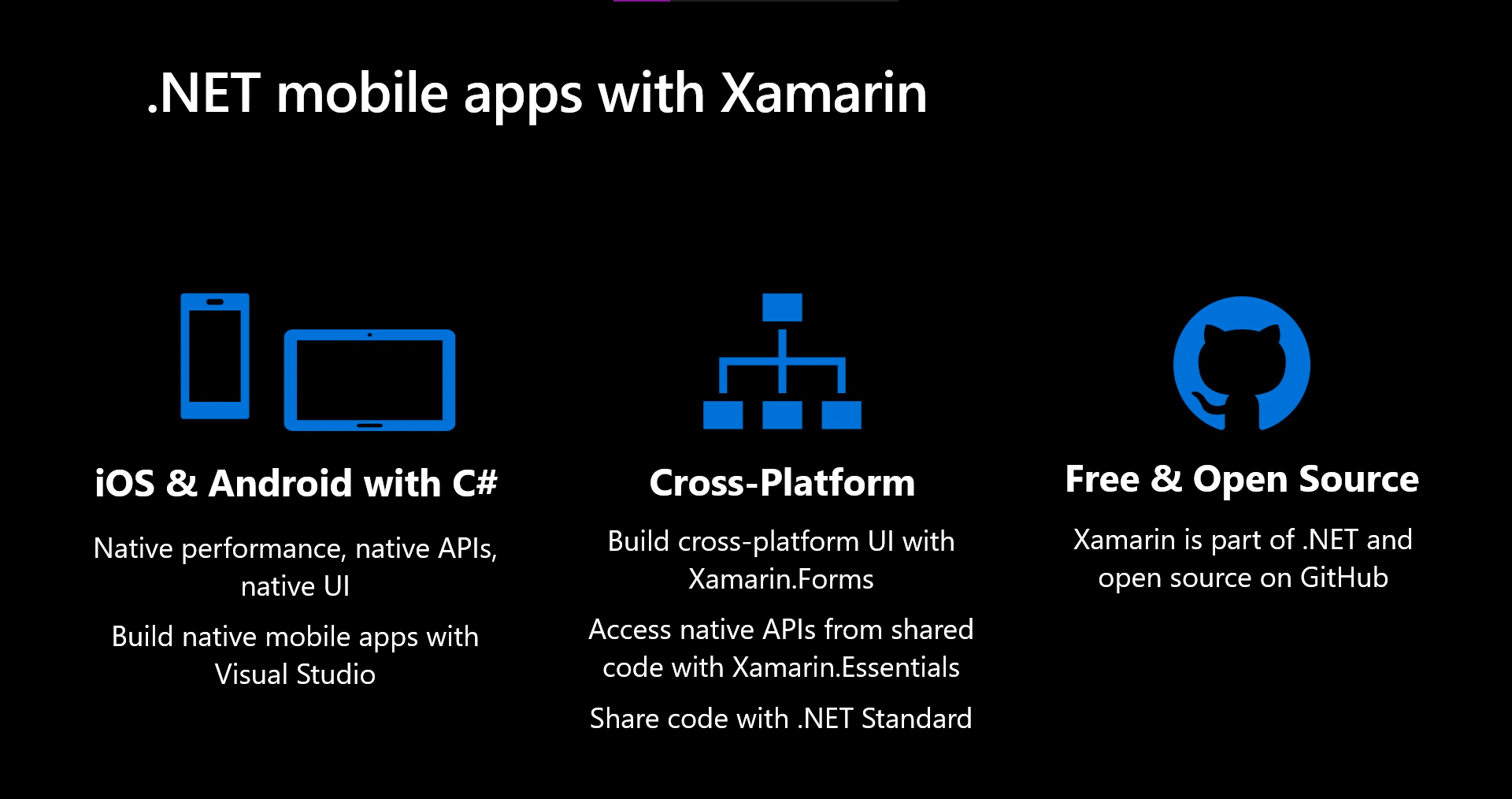
Xamarin is an open-source .NET platform for building iOS, Andriod, macOS, and Windows applications. It was introduced in 2011. It allows us to share business logic across platforms, using .NET, while creating a native UI for each. Xamarin allows developers to share an average of 90% of their application across platforms. To help with the overhead of creating native UI’s for each platform, we have Xamarin.Forms.

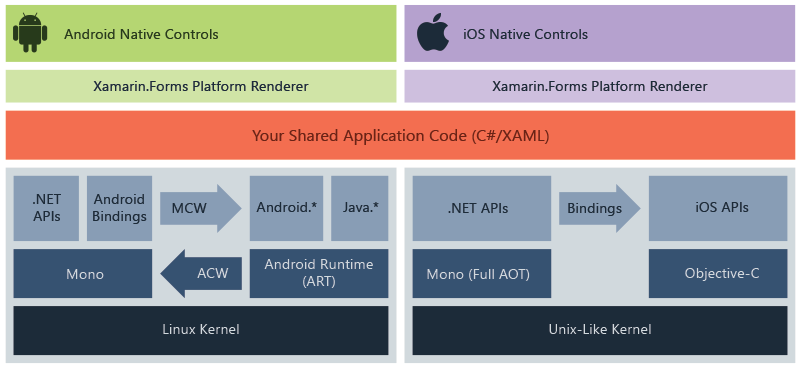
Xamarin.Forms is an open-source UI framework that allows us to combine the code for Xamarin.Android, Xamarin.iOS, Xamarin.Mac, and Windows applications into a single shared codebase.

Microsoft is now thinking about creating a unified .NET platform that can replace .NET Framework, .NET Core, and Xamarin. .NET MAUI is the next step in unifying .NET by replacing Xamarin.Forms. It addresses some of the issues and downsides of Xamarin.Forms, while providing an updated architecture on top of the new generation of .NET and project system.

Difference between MAUI and Xamarin.Forms

Microsoft is rebuilding the core of Xamarin.Forms, bringing us performance improvements, consistent design systems, and an extension from mobile to desktop. Now you may ask if we use Xamarin.Forms then why should we move to MAUI? Why is so special about MAUI?

.NET MAUI provides cross-platform APIs for native device features. It has some major Improvements like a Single project experience across platforms and .NET hot reload. .NET MAUI allows us to have a single project experience instead of one project for each target platform. We can use one language across our application to target all the supported platforms and easily share resources across them while maintaining an option for platform-specific code. Also the Model-View-ViewModel (MVVM) and XAML pattern used in existing Xamarin.Forms applications will continue to be supported and improved with the evolution. .NET MAUI will introduce further support for the Model-View-Update (MVU) development pattern, popular in C#, enabling developers to write fluent C# UI and create a code-first development experience.

How .NET MAUI works?

.NET MAUI unifies Android, iOS, macOS, and Windows APIs into a single API that allows a write-once run-anywhere developer experience, while additionally providing deep access to every aspect of each native platform.

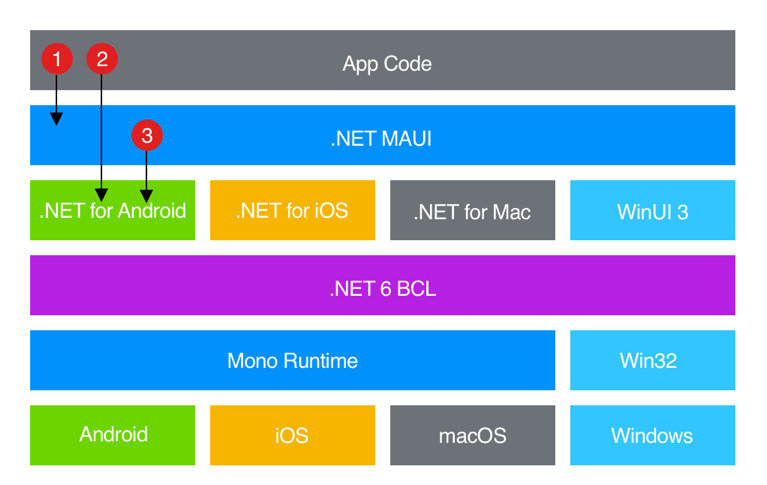
.NET 6 provides a series of platform-specific frameworks for creating apps: .NET for Android, .NET for iOS, .NET for macOS, and Windows UI 3 (WinUI 3) library. These frameworks all have access to the same .NET 6 Base Class Library (BCL). This library abstracts the details of the underlying platform away from your code. The BCL depends on the .NET runtime to provide the execution environment for your code. For Android, iOS, and macOS, the environment is implemented by Mono, an implementation of the .NET runtime. On Windows, Win32 provides the execution environment.

.NET MAUI provides a single framework for building the UIs for mobile and desktop apps. The following diagram shows a high-level view of the architecture of a .NET MAUI app:

.NET MAUI architecture diagram.

In a .NET MAUI app, you write code that primarily interacts with the .NET MAUI API (1). .NET MAUI then directly consumes the native platform APIs (3). In addition, app code may directly exercise platform APIs (2), if required.

About .NET hot reload

.NET MAUI includes support for .NET hot reload, which enables you to modify your managed source code while the app is running, without the need to manually pause or hit a breakpoint. Hot reload increases productivity for .NET developers, allowing instant updates to running applications with new code changes. .NET MAUI includes support for XAML hot reload, which enables you to save your XAML files and see the changes reflected in your running app without recompilation. In addition, your navigation state and data will be maintained, enabling you to quickly iterate on your UI without losing your place in the app.

During Microsoft Build 2021, Microsoft announced the availability of .NET MAUI Preview 4. Each preview provides us with more features and tools with general availability scheduled for November 2021 at .NET Conf. With the release of Preview 4, we can now create functional applications across all supported platforms using .NET MAUI. In addition, they have added new capabilities to support running Blazor on desktop using .NET MAUI, allowing the reuse of Blazor UI components across native desktop and web applications. Alongside Preview 4 is the release of Visual Studio 2019 version 16.11 Preview. The Visual Studio 2019 16.11 Preview enables .NET Hot Reload for MAUI and provides productivity features for developing .NET MAUI projects. To see what is coming in future releases, visit the MAUI product roadmap.

Judge Character with Char.Is

No Comments »

There are multiple static “Is” methods on the Char structure that help determine a character’s category. All of these methods (except IsSurrogatePair) take a single character argument (or string and index) and return a boolean whether the character is in the corresponding category.

Read the rest of this entry »

Having Pun with C#

8 Comments »

Here is a collection of puns that only a C# programmer could appreciate:

  • abstract art gallery() { … }
  • bool me_over;
  • byte me;
  • c++;
  • case in_point:
  • char broiled;
  • class action { … };
  • const int pressure;
  • Convert.ToString( hemp );
  • decimal results;
  • double jeopardy;
  • Exception taken;
  • event handling;
  • for (score = 20; years == 7; ) { … }
  • foreach (hot chick in this.room) { flirt(); }
  • float valve;
  • Graphics ex;
  • int erupt;
  • lock (this.up) { … }
  • long john_silver;
  • long walk(short pier) { … }
  • object strongly;
  • override your objection() { … }
  • private property keep_out() { … }
  • protected free speech() { … }
  • public display of_affection() { … }
  • return to_sender;
  • short circuit;
  • sizeof (the_situation);
  • static cling free() { … }
  • string cheese;
  • struct by_lightning { … };
  • take a; break;
  • throw up;
  • typeof (writer);
  • uint rested;
  • ulong for_love;
  • unsafe { at any = speed; }
  • using your.brain;
  • virtual void in_my_heart() { … }
  • void where_prohibited() { … }
  • while (e_coyote) { … }

And for the grand finale:

    struct SoftwareConsultant {
        double   salary;
        long     lunches;
        float    jobs;
        char     unstable;
        void     work;
        int      hiring_him_again;
        const    pain_in_the_backside;
        unsigned agreement;
        short    fuse;
        volatile personality;
        static   progress;
    };
    /* and there are no unions in sight */

Source: Some original, some from here and here.

C# Object Initialization

4 Comments »

When constructing a C# Object, it’s important to understand the order in which the object’s fields and constructors are initialized:

Read the rest of this entry »

Free Developer Tools

4 Comments »

Following are some simple but useful FREE tools for software developers. Each tool is freely distributable and includes the original C# source code so you can modify the tool to your needs. These tools are not supported. Enjoy!

Color Gadget

Select a .NET KnownColor or other color, copy RGB and hex values to the clipboard.

Free Download

Guid Generator

Generate a new globally-unique ID and copy it to the clipboard.

Free Download

Hex Converter

Quickly convert between hex and decimal numbers.

Free Download

Shortcut Replace

Search/replace the path and working directory in a collection of shortcut (.lnk) files.

Free Download

Visual Studio Toolbox Installer

Console program that installs/removes tabs and custom controls and components in the Visual Studio .NET Toolbox.

Free Download

Window Watcher

Shows the form and client bounds of the active window.

Free Download

keep looking »