
Apr 12
The .NET FolderBrowserDialog class does not have an InitialDirectory property like the OpenFileDialog class. But fortunately, it’s quite easy to set an initial folder in the FolderBrowserDialog:
FolderBrowserDialog dialog = new FolderBrowserDialog();
dialog.RootFolder = Environment.SpecialFolder.Desktop;
dialog.SelectedPath = @"C:Program Files";
if (dialog.ShowDialog() == DialogResult.OK)
{
    Console.WriteLine( dialog.SelectedPath );
}
Note that you can choose other RootFolder’s like MyComputer and MyDocuments. The SelectedPath must be a child of the RootFolder for this to work.
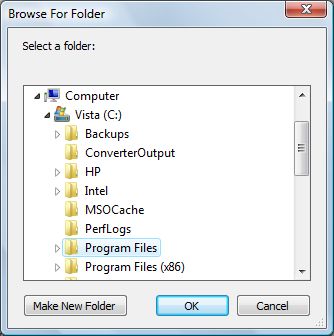
Given the sample code above, the dialog may look like this:
thanks man for the tutorial !!
can i take it for my blog ?
Gracias, excelente