
One of the many changes in the upgrade to Visual Studio 2008 is how Ctrl+Tab switches between open documents in the IDE. Ctrl+Tab used to show the previously viewed document. But in VS 2008, the IDE Navigator window appears as shown below, and you must press Enter to show the previous document. An additional Enter key doesn’t sound like a big inconvenience, but if you do this hundreds of times each day like most developers, you will quickly find the extra step irritating. This article describes how to disable the Ctrl+Tab navigator window in Visual Studio 2008.
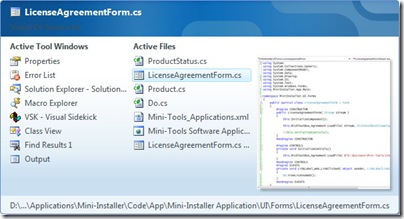
What you might not know is that Ctrl+F6 now works the way Ctrl+Tab used to. And since the navigator window can be useful at times, you may want to simply switch the functionality between Ctrl+Tab and Ctrl+F6 as follows:
- In Visual Studio, click the “Tools > Options” menu item.
- Select the “Environment > Keyboard” options.
- Switch the keyboard assignments as follows:
| Macro | Shortcut Key |
| Window.NextDocumentWindow | Ctrl+Tab |
| Window.NextDocumentWindowNav | Ctrl+F6 |
| Window.PreviousDocumentWindow | Ctrl+Shift+Tab |
| Window.PreviousDocumentWindowNav | Ctrl+Shift+F6 |
Another Ctrl+Tab Tip
Here’s something else you may not know. Of course Ctrl+Tab shows the previous document. Press Ctrl+Tab repeatedly and you will cycle between the last two documents you viewed. But if you press and hold the Ctrl key, then press the Tab key multiple times, you will show the documents you previously viewed in the reverse order that you viewed them.
Wasn’t aware of the ctrl-f6 option… awesome
For what it’s worth, you shouldn’t have to press enter with ctrl-tab, just highlight whatever document / form you want and release the keys and it switches… works similar to alt-tab in windows. Holding ctrl down and repeating the tab key will cycle. The only thing I can’t figure out with the ctrl-tab is how to switch between the active files and active tool windows columns without using the arrow keys… that rather sux.
Is there a way to make the tabbing work like every other tab control? I hate the default way. It only works if you only have two tabs open. As soon as you go to three, you never know which tab you’re going to.
Jeff, not that I know of. I like how Ctrl+Tab switches back & forth between two documents, but I agree, I’d prefer if tab navigation worked like Firefox: Ctrl+Tab moves right, Ctrl+Shift+Tab moves left.
Lloyd, on my PC the Navigator window remains open and I have to press Enter or Escape to close it. Perhaps there is another setting that determines how the Navigator window works?
Timm,
Not sure on the setting, I don’t recall anything and spinning through options nothing stood out. I run vs2k8 developer and vs2k8 pro on two different systems and both work similarly. screwy.
Screwy is right! Here was my experience when pressing Ctrl+Tab in Visual Studio:
VS 2003 – no Navigator window
VS 2005 – Navigator window disappears when release Ctrl
VS 2008 – Navigator window does not disappear when release Ctrl; must press Enter or Escape
I had a similar experience, except I know for a fact that at one time my visual studio Ctrp+Tab was not behaving this way. I did however find a link to the solution for my particular issue:
http://forums.microsoft.com/MSDN/ShowPost.aspx?PostID=2467648&SiteID=1&mode=1
As mentioned by another commenter, Enter is not a required press to switch documents, but just letting go of the keys is sufficient. However, I had a noticable delay when switch documents as (I believe) it generated the thumbnail for my document (as if source code has an appreciable thumbnail).
Switching back to the classic control-tab is much faster. Thanks for the tip.
Hello together,
fyi.. found out that you can hit Alt + F7 to switch the same way through the toolbox windows like you use Ctrl + Tab to switch (with vs default settings) through the code / designer windows..
Regards,
Kris
I too had a problem where on Ctrl + Tab the Navigator gets stuck until i hit the Enter button.
The reason that happened in my box is due to the “Microsoft Narrator” by mistake i guess i have selected some of the checkboxes and that initiated the Navigator to get Stuck in Visual Studio 2008 and SQL Server Studios.
I hope this might help somebody having the similar problem. Thanks
@Shiva, how the hell did you figure that out… its being driving me absolutely crazy. Your awesomeness has been noted 🙂
Just uncheck all checkboxes under “Text-To-Speech” narrator software.
–> To open Narrator using the keyboard, press CTRL+ESC, press R, type narrator, and then press Enter.
I really don’t like that ctrl+tab navigator shows complete file paths. I hate it. Because when I have long paths I cannot directly see the file name and guess until I keep pressing TAB and moving. Whata misery. Is there anyway that this navigator only shows File Names? and not full paths?
I have found that having Speech Recognition turned on has the same affect as having Narrator turned on. So if you find CTRL+TAB is stuck for you, check to see if you have Speech Recognition turned on.
-Jamie