Jun 08
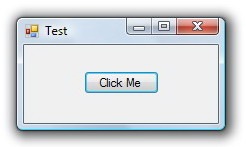
When you create a Form with a border, Windows automatically draws a drop shadow around the form, as shown here:
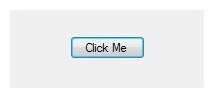
However, if you set the form’s FormBorderStyle property to None, Windows draws neither the form border nor the drop shadow, as shown here:
Read the rest of this entry »
Apr 12
The .NET FolderBrowserDialog class does not have an InitialDirectory property like the OpenFileDialog class. But fortunately, it’s quite easy to set an initial folder in the FolderBrowserDialog:
FolderBrowserDialog dialog = new FolderBrowserDialog();
dialog.RootFolder = Environment.SpecialFolder.Desktop;
dialog.SelectedPath = @"C:Program Files";
if (dialog.ShowDialog() == DialogResult.OK)
{
    Console.WriteLine( dialog.SelectedPath );
}
Note that you can choose other RootFolder’s like MyComputer and MyDocuments. The SelectedPath must be a child of the RootFolder for this to work.
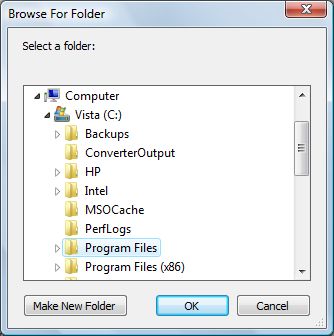
Given the sample code above, the dialog may look like this:
Apr 29
Sometimes it’s important to understand the order of events that occur when a WinForms Form is opened, closed, shown or hidden. There are also a few “gotchas” that are important to know.
Read the rest of this entry »
Apr 06
It’s common UI courtesy to show the Wait cursor when performing a long operation that requires the user to wait. Here is how the Wait cursor appears in Windows Vista:

But developers often go about this the wrong way by setting the Cursor.Current property as follows:
Cursor.Current = Cursors.WaitCursor;
Read the rest of this entry »
Feb 27
Closing all forms in an application seems like it would be a simple task of using a foreach loop in the Application.OpenForms collection, such as:
foreach (Form form in Application.OpenForms)
{
    form.Close();
}
But there are two problems.
Read the rest of this entry »
Feb 06
So you’ve set the ToolTipText property of a TabPage in a TabControl. When the user moves the mouse pointer over the tab, the text you specified is supposed to show in a tooltip.
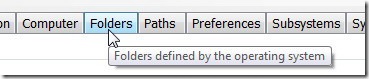
But what if the tooltip is not showing? Fortunately, this problem has an easy solution:
Set the ShowToolTips property in the TabControl to true.
Sep 02
The DataGridView is a powerful grid control included in the .NET Framework. One function missing, however, is the ability to hide the current selection when the DataGridView control is not focused. What the DataGridView class needs is a HideSelection property, similar to the ListView and TextBox. But the .NET designers have not included this capability in the DataGridView class.
Read the rest of this entry »
Jul 15
Sometimes it can be challenging to read the Details view in a ListView, especially if the rows are long. This article shows how to add shading to every second row to make a ListView easier to read.
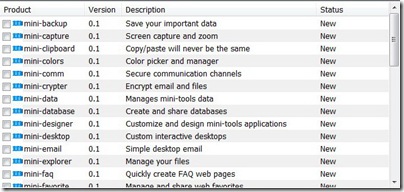
Read the rest of this entry »
Jul 02
For some operations such as logging on to a web site or downloading a web page, you may not know how long it will take the operation to finish. So instead of showing a progress bar with a specified percent complete, you can set the .NET ProgressBar to cycle continuously.

Read the rest of this entry »
May 15
Methods that affect a Windows Forms control can be executed only on the thread that created the control. .NET does not permit directly manipulating controls across threads. The Visual Studio compiler under .NET 2.0 will mark these attempts as errors. .NET 1.1 will allow them, but these will often result in unexpected behavior like incorrectly-painted controls.
Read the rest of this entry »