Intro to C# Game Development

No Comments »

.NET is a cross-platform and open-sourced developer platform for building different types of applications. The tech-giant Microsoft developed it. It’s also designed for new developers trying to learn how to use .NET by making games. Here we will discuss why and what are the benefits of using .NET in game development. We will also talk about the different game engines in .NET and its tools, which make .NET a perfect choice for developing games. .NET is also part of Microsoft Game Stack, a comprehensive suite of tools and services just for game development.

Why use .NET in game development?

The major plus for .NET is that it is a cross-platform, a single code base can be used on different operating systems, be it Windows, MAC, or Linux. So developing a game in .NET means it is compatible with all these platforms.

.NET works seamlessly with game engines like Monogame and Unity, and many more. You can create incredible 2D and 3D games using these. Game engines and framework developers are using .NET to ensure secure cross-platform scripting for multiple gaming platforms. Another significant advantage is developing your game and its mobile application, website, and other online services using the same platform. So why not use .NET in game development.

What is a Game Engine?

Not so long ago, developers used to make their games from scratch, but now they have made a lot of reusable code in their games and have made APIs and tools they can reuse for each game. So whenever a developer is developing a new game, they can make use of all these.

A game engine is a software development environment designed to build video games. They contain abstraction of graphics, input, and media API. And also, asset managers and design tools for audio and visuals.

With the increasing popularity of C#, more engines are now being used .NET. The mono runtime compatible with .NET 5 can run C# code on many platforms like Android, iOS, Mac, etc. It is one of the main reasons for using .NET in game development.

Available game engines

The first step to developing games in .NET is to choose a game engine. You can think of engines as the frameworks and tools you use for developing your game. There are many game engines that use .NET and they differ widely.

Stride

It was developed by Silicon Studios, an utterly integrated engine with a graphic editor. It is a complete C# and .NET engine which is open-source and royalty-free. Another advantage is you can use parts of these engines independently

Mono Game

Mono Game is a very flexible engine; other game engines even use this as their base. FlatRedBall is an example of this. It can be used as a framework to build other game engines. Many game developers use it for their cross-platform game development.

Wave Engine

Another game engine that is fully developed in .NET is WaveEngine. It has a lot of reality features like spatial audio and ready to use out of the box. It has many of its components open-sourced and free.

NeoAxis

NeoAxis is yet another game engine written purely in .NET. It is also free and open-sourced. It supports a whole lot of features like the latest Android release

Online services for your game

If you’re building your game with .NET, then you have many choices on how to build your online game services. You can use ready-to-use services like Microsoft Azure PlayFab. You can also build from scratch on Microsoft Azure. .NET also runs on multiple operating systems, clouds, and services, it doesn’t limit you to use Microsoft’s platforms.

The ecosystem

The .NET game development ecosystem is rich. Some of the .NET game engines depend on foundational work done by the open-source community to create managed graphics APIs like SharpDX, SharpVulkan, Vulkan.NET, and Veldrid. Xamarin also enables using platform native features on iOS and Android. Beyond the .NET community, each game engine also has their own community and user groups you can join and interact with. .NET is an open-source platform with over 60,000+ contributors. It’s free and a solid stable base for all your current and future game development needs.

Rich set of .NET tools

.NET is vibrant in terms of game development tools. As it is an open-source platform with a rich community of developers and users. Most of the .NET engines also depend on the base of other open-source work. In addition to the community of .NET developers, each of these game engines also has a different user base. They need different kinds of tools according to their needs and .Net has a variety of tools to help them. .NET tools you are used to are also used for making games. Visual Studio is a great IDE that works with all .NET game engines on Windows and macOS. It provides word-class debugging, AI-assisted code completion, code refactoring, and cleanup. It works seamlessly with all of the game engines. In addition, it provides real-time collaboration and productivity tools for remote work. Another feature is assisted in code completion and cleanup. Also, it includes code refactoring. This perfect environment is the reason for the growing demand for .NET in game development. GitHub also provides all your DevOps needs. Host and review code, manage projects, and build software alongside 50 million developers with GitHub.

Conclusion

Indeed, the future of .NET in game development is bright. Game Engines use the latest versions of .NET, and it even gets upgraded as the new version releases. With strong game engines, a rich set of tools, and C# .NET’s growing popularity is gamers’ favorite. That’s why it has become one of the best choices for game developers.

NODE.JS VS ASP.NET CORE: Which One to Choose?

No Comments »

The software industry offers multiple choices for developers and business owners. Some languages come and go forever, and some make a toll in the industry and immediately gain popularity, such as ASP.NET Core and Node.js. These are the two most popular software development environments with strong community support that help the skilled .NET Core developers in speeding up, fastening, and scaling up the entire development process. Before choosing any programming language let us know more about these two programming platforms and see what they have to offer.

The Basics

Node.js

As an alternative to Apache HTTP Server, Node.js was created for Apple’s, SmartOS, FreeBSD, AIX, Microsoft Windows, Android, and Linux operating systems. As the official site explains Node.js is a software platform built on the basis of V8, where V8, in turn, is the JavaScript engine developed by Google with open source code written in C++.

In this modern age, JavaScript has become the most interesting trend. Companies are migrating their sites to JavaScript-based technologies. Nodejs is a cross-platform runtime environment that connects libraries written in different programming languages and also enables interaction with I/O devices. Developers can use Node.js in web development by utilizing an agile software development approach. It offers both scalable and robust services to clients.

ASP .NET Core

ASP.NET Core is one of the most important open-source web application frameworks. It is developed and designed by Microsoft. It is a framework created on CLR (Common Language Runtime) that enables the developers to use any .NET dialect like C# (object-oriented), VB .NET (a bequest of Visual Essential), F# (utilitarian to begin with), C++, and more.

The .NET Core framework offers a wide range of web forms MVC and uses HTML5, JavaScript, CSS, and Templates which are used to create different types of services and applications for Windows. But ASP.NET Core is used to create dynamic web pages and it is a part of the .NET Core framework.

Performance

Node.js

When it comes to the performance of Node.js, many developers in the market believe that applications created using Node.js offer better performance. This technology is capable of handling multitasking with ease and this is because it works on JavaScript engine V8, the high-performing engine. Besides this, it can also tackle more traffic on the server.

.NET Core

In comparison to Node.js performance, ASP.NET Core only proves its robustness for a certain type of project. Node.js can manage tasks that require less computation. But with time .NET Core has become 15% faster and this has made it a good choice for developers.

Stability & Reliability

ASP.NET Core/.NET Core is a winner in this category. The security and reliability the platform provides make it a great option to create robust software with C# language. Node.js is more reliable for complex enterprise software developed with TypeScript than on its own.

Node.js is a technology that is known as a full-stack JavaScript framework that serves both the server-side and client-side of the applications. This technology can interpret the JavaScript code with the help of the JavaScript v8 engine by Google. And it complies with the JS code into the machine code directly without any issues. This approach enables faster and better implementation of code and also the code execution is also enhanced by the JavaScript runtime environment.

On the other hand, one of the most important advantages of the .NET Core is to offer high performance and optimize the code to offer better results. ASP.NET Core is a technology that demands less coding and this helps the developers to easily optimize the code. And because of this, the development team has to spend less time creating a solution and this helps in cutting down the budget.

Community Support

Both development environments can boast of having active and strong community support which ultimately means it won’t be burdensome to find a solution to the problem. However, keep in mind that .NET has more community support on Stack Overflow whereas Node.js is supported more via GitHub. The best example is the Stack Overflow question and answer website which has around 4 million registered users.

The community support for .NET Core appears to be rising as well. Every day, the official Dotnet YouTube channel posts useful videos that engage the community in a good way.

How to make the right decision?

Node.js is one of the most popular JavaScript-based platforms that is designed to increase the use of JS in creating efficient and scalable network applications, and the ASP.NET core is a platform that enables the use of different libraries, programming languages, and editors to create websites, web apps, and mobile apps. There are such sites as Microsoft, StackOverflow, and Dell that run on a .NET environment. Again developers can use Node.js for creating web applications and APIs for various operating systems like Windows, Linux, and OS X. Besides, using this technology you can create apps for big companies like Uber, PayPal, LinkedIn, Netflix, eBay, and more. If you know the type of app or software you want to develop it will be easier for you to choose the solution.

Conclusion

When it comes to choosing a technology out of these two modern platforms, ASP.NET Core is a web application development technology that can be more suitable for small and medium-size solutions. While on the other Node.js is used when the developers want to create a robust solution for the clients which is also lightweight. This proves that the selection depends on the project type, size, and the need for the functionalities in that project.

Some of The Best Tools You Can Use as A .NET Developer

No Comments »

The .NET framework is one of the most popular open-source frameworks that is used by millions of software developers. According to the latest estimates, there are over 6 million .NET engineers worldwide. This has spurred the growth of various third-party development tools. To get a first-hand opinion on the most valuable and useful developer tools out there. Today, we presented a compiled list of essential .NET developer tools. Let’s have a look at the 10+ most valuable tools every .NET developer should use.

Best Tools for .NET Developers

Visual Studio Gallery

This is an essential tool that offers quick access to Visual Studio extensions, controls, and templates. The marketplace integrates with the IDE, allowing you to access over 7,000 products currently available. The Visual Studio Gallery is critical in how you locate the right extension for your needs. Without the VS Gallery, clicking on Extensions in VS wouldn’t work.

GitHub Extension for Visual Studio

With version control being so popular, Microsoft couldn’t ignore GitHub by NOT including it within Visual Studio. For developers, GitHub is vital. This extension helps us to connect our IDE directly to our GitHub repositories. This means that one can create, clone, and publish your projects, and create or view pull requests right within Visual Studio.

ReSharper

A developer who wants to become more productive when writing C# code should run, not walk, to purchase this tool. This is a Visual Studio extension by JetBrains. ReSharper adds the power to analyze code quality, then to find and fix the errors quickly. It also has several shortcuts for quick and easy refactoring and navigation.

NDepend

NDepend is also a Visual Studio extension for static code analysis. For optimizing and refactoring code at a high level, NDepend is one of the best. It essentially allows developers to see the “wood for the trees”, giving a wide view of your application and how is your code organized. The tool helps us measure our code quality using various metrics, to visualize its design, and to accurately estimate your technical depth, right within the IDE.

NuGet

NuGet is a package manager for .NET that allows you to access various third-party libraries, or to create and share your tools. With over 98 thousand packages currently available, it is the largest database of third-party components for .NET. NuGet streamlines the delivery of third-party components directly into your Visual Studio project at design time and contains a command line for CI/CD automated deploys.

Web Essentials for Visual Studio

This Visual Studio extension augments the core VS functionality with more powerful and useful features, including task shortcuts and improved Intellisense for CSS/HTML/JavaScript, etc. This is a handy tool for web developers using Visual Studio that can be a real productivity booster. In this one extension, you receive custom editors, a Browser Link to immediately see changes in the browser, TypeScript, Less, Markdown, and CoffeeScript support.

Novi Builder

Novi Builder is a visual HTML editor that allows changing texts, images, links, backgrounds, and other elements effortlessly. There are 200+ useful elements that make it possible to create different pages. Novi also provides a code editor to work with HTML, CSS, and JS code for your online projects.

.NET Reflector

.NET Reflector is a decompiler and static analyzer for the .NET framework. It helps you understand and debug your .NET code, including third-party components, even if you don’t have any documentation or comments. It also gives us a solid insight into what an assembly contains and what code is actually doing when decompiled.

SQLComplete

SQLComplete is a productivity tool that augments the SQL Server Management Studio with several useful features, including tab coloring, script generation, navigation, and more. Full-stack developers always get their hands dirty with SQL. This freemium tool is the equivalent of Intellisense in C# and plugs into SQL Server Query Analyzer and Visual Studio. Along with its exceptional Intellisense capabilities, it also has a handful of features to assist with snippets, templating, and SQL formatting.

LINQPAD

This is a safe playground where you can test your LINQ queries or any C#/F#/Visual Basic program. The tool has a built-in debugger and autocomplete features, and is a perfect platform for prototyping with instant feedback. LIt is simply a Notepad for LINQ and also an essential tool for experimenting with LINQ and testing code snippets before they are introduced into code.

ELMAH

ELMAH stands for Error Logging Modules and Handlers. It is an open-source debugging and error logging tool for ASP.NET, and is provided by Google. It really stands in comparison to some other paid .NET logging solutions that you can find online.

Microsoft Web Platform Installer

This free package management software makes it easy to access the latest components of the Microsoft Web Platform, including IIS, SQL Server Express, .NET Framework, Visual Web Developer, and much more. The system keeps you up to date by automatically installing the latest versions of each component.

Conclusion

The choice of .Net tool varies greatly on the specific task or situation. Using additional instruments can free you from routine tasks and automate many processes, thus optimizing your performance and eliminating errors. Some of them have some similar as well as some unique features that can be very helpful on a specific situation.

MAUI Lets You Create a Cross-Platform Mobile App with .NET and C# From a Single Codebase

No Comments »

What if we could create native mobile apps and desktop apps using .NET C# and XAML from a single code base? How cool would that be? Yes, now we can create native Android, iOS, macOS, and Windows applications from a single code base. This is possible using .NET’s new feature called Multi-platform App UI (MAUI). .NET Multi-platform App UI (.NET MAUI) is a cross-platform framework for creating native mobile and desktop apps with C# and XAML. Microsoft Build 2020 announced that Microsoft has evolved Xamarin.Forms and taken the next step in the .NET unification to give us a cross-platform mobile-first framework for Android, iOS, macOS, and Windows. .NET MAUI will introduce new ways to build applications – available in .NET 6 and in preview now!

What is .NET MAUI?

.NET Multi-platform App UI (MAUI) is the evolution of Xamarin. Forms extended from mobile to desktop scenarios with UI controls rebuilt from the ground up for performance and extensibility. – Maddy Leger, Program Manager Xamarin/.NET MAUI Team. is an open-source cross-platform framework which can be used to develop and build native Android, iOS, macOS, and Windows applications from a single code base.

What are Xamarin and Xamarin.Forms?

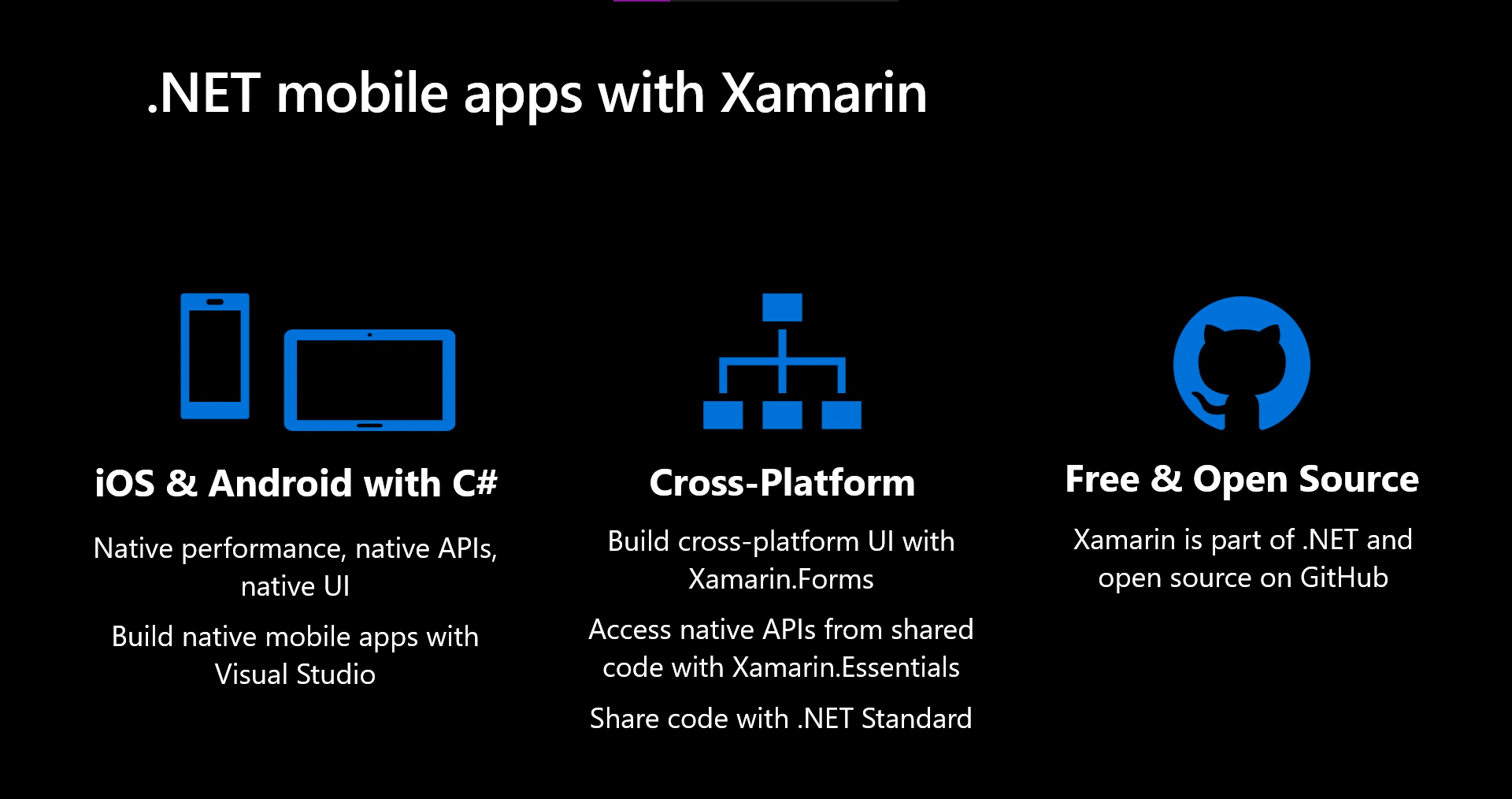
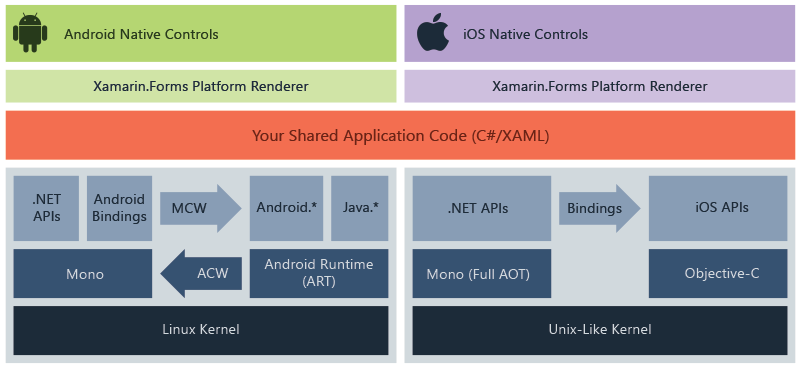
Xamarin is an open-source .NET platform for building iOS, Andriod, macOS, and Windows applications. It was introduced in 2011. It allows us to share business logic across platforms, using .NET, while creating a native UI for each. Xamarin allows developers to share an average of 90% of their application across platforms. To help with the overhead of creating native UI’s for each platform, we have Xamarin.Forms.

Xamarin.Forms is an open-source UI framework that allows us to combine the code for Xamarin.Android, Xamarin.iOS, Xamarin.Mac, and Windows applications into a single shared codebase.

Microsoft is now thinking about creating a unified .NET platform that can replace .NET Framework, .NET Core, and Xamarin. .NET MAUI is the next step in unifying .NET by replacing Xamarin.Forms. It addresses some of the issues and downsides of Xamarin.Forms, while providing an updated architecture on top of the new generation of .NET and project system.

Difference between MAUI and Xamarin.Forms

Microsoft is rebuilding the core of Xamarin.Forms, bringing us performance improvements, consistent design systems, and an extension from mobile to desktop. Now you may ask if we use Xamarin.Forms then why should we move to MAUI? Why is so special about MAUI?

.NET MAUI provides cross-platform APIs for native device features. It has some major Improvements like a Single project experience across platforms and .NET hot reload. .NET MAUI allows us to have a single project experience instead of one project for each target platform. We can use one language across our application to target all the supported platforms and easily share resources across them while maintaining an option for platform-specific code. Also the Model-View-ViewModel (MVVM) and XAML pattern used in existing Xamarin.Forms applications will continue to be supported and improved with the evolution. .NET MAUI will introduce further support for the Model-View-Update (MVU) development pattern, popular in C#, enabling developers to write fluent C# UI and create a code-first development experience.

How .NET MAUI works?

.NET MAUI unifies Android, iOS, macOS, and Windows APIs into a single API that allows a write-once run-anywhere developer experience, while additionally providing deep access to every aspect of each native platform.

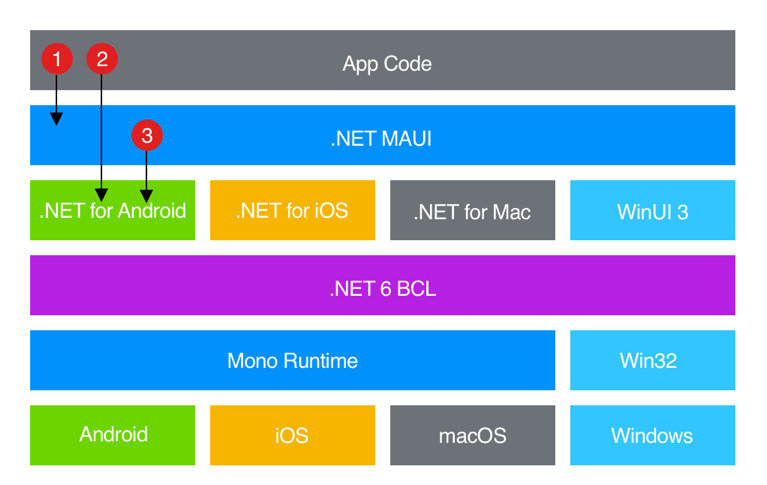
.NET 6 provides a series of platform-specific frameworks for creating apps: .NET for Android, .NET for iOS, .NET for macOS, and Windows UI 3 (WinUI 3) library. These frameworks all have access to the same .NET 6 Base Class Library (BCL). This library abstracts the details of the underlying platform away from your code. The BCL depends on the .NET runtime to provide the execution environment for your code. For Android, iOS, and macOS, the environment is implemented by Mono, an implementation of the .NET runtime. On Windows, Win32 provides the execution environment.

.NET MAUI provides a single framework for building the UIs for mobile and desktop apps. The following diagram shows a high-level view of the architecture of a .NET MAUI app:

.NET MAUI architecture diagram.

In a .NET MAUI app, you write code that primarily interacts with the .NET MAUI API (1). .NET MAUI then directly consumes the native platform APIs (3). In addition, app code may directly exercise platform APIs (2), if required.

About .NET hot reload

.NET MAUI includes support for .NET hot reload, which enables you to modify your managed source code while the app is running, without the need to manually pause or hit a breakpoint. Hot reload increases productivity for .NET developers, allowing instant updates to running applications with new code changes. .NET MAUI includes support for XAML hot reload, which enables you to save your XAML files and see the changes reflected in your running app without recompilation. In addition, your navigation state and data will be maintained, enabling you to quickly iterate on your UI without losing your place in the app.

During Microsoft Build 2021, Microsoft announced the availability of .NET MAUI Preview 4. Each preview provides us with more features and tools with general availability scheduled for November 2021 at .NET Conf. With the release of Preview 4, we can now create functional applications across all supported platforms using .NET MAUI. In addition, they have added new capabilities to support running Blazor on desktop using .NET MAUI, allowing the reuse of Blazor UI components across native desktop and web applications. Alongside Preview 4 is the release of Visual Studio 2019 version 16.11 Preview. The Visual Studio 2019 16.11 Preview enables .NET Hot Reload for MAUI and provides productivity features for developing .NET MAUI projects. To see what is coming in future releases, visit the MAUI product roadmap.

Visual Studio 2008 and .NET 3.5 Released

No Comments »

Microsoft has released Visual Studio 2008 and .NET Framework v3.5. These upgrades enable .NET software developers to rapidly create more secure, manageable, and reliable applications and take advantage of new features found in Windows Vista and Microsoft Office 2007.

Read the rest of this entry »

Microsoft to Share .NET Framework Code

1 Comment »

Microsoft has announced that it will release the source code for the .NET Framework with .NET version 3.5 later this year. Microsoft will release the code under its Reference License. This is essentially “read-only mode,” meaning that you can view the source code for reference and debugging, but you cannot modify or distribute the code. This is Microsoft’s most restrictive shared-code license and should not be confused with “open source” code such as Linux and the projects on SourceForge.Net. Read the rest of this entry »

C# String Tips

90 Comments »

The .NET string class is quite comprehensive, yet some common string functions are missing or not entirely obvious. This article provides quick tips on using .NET strings.

Read the rest of this entry »

Determine the .NET Versions on which an Application is Compiled and Running

No Comments »

The version of .NET against which you compile an application or assembly may not be the same version of .NET on which the application is currently running. A .NET application should always be able to run on the same or newer version of .NET against which it was compiled.

This is because .NET is backward compatible. This means that an application compiled on .NET v1.1 should run OK on .NET v2.0 and v3.0. But an application compiled on .NET v2.0 will not run on .NET v1.1.

Read the rest of this entry »

Determine Installed .NET Versions from a Web Page

4 Comments »

You can use the following JavaScript code in a web page to determine which versions of .NET are installed on a client PC:

Read the rest of this entry »

Change Font Style

13 Comments »

Changing a font style is a bit easier than changing its size, as there is a Font constructor that accepts a font and style as arguments. For example, to bold a label’s font:

Read the rest of this entry »

« go backkeep looking »