.NET vs. .NET Framework: Choosing the Right Option for Server Apps

No Comments »

As the demands for robust and efficient server applications continue to grow, choosing the right platform for development has become increasingly crucial. In this article, we will compare .NET and .NET Framework, highlighting their differences, benefits, and considerations for choosing the right option. By the end of this guide, you will have a better understanding of which option best suits your server app development needs.

Let’s dive in and explore the world of .NET and .NET Framework for server apps!

What is .NET?

.NET is a free, open-source framework developed by Microsoft that allows developers to create applications for the Windows operating system. .NET can be used to create a wide range of applications, from small console programs to large-scale web applications.

One of the main benefits of using .NET is that it is platform-independent, meaning it can be used to create applications that run on different operating systems, such as Windows, Linux, and macOS. The framework also includes a large set of libraries and tools that can help developers build robust and efficient applications quickly and easily.

What is .NET Framework?
.NET Framework is a software framework developed by Microsoft that is widely used for building and running Windows-based applications. It is an integral part of the .NET platform and provides a runtime environment and a set of libraries and components that developers can use to create applications.

The main goals of .NET Framework are to provide a consistent programming model for building applications, to enable code reuse and compatibility across different versions of Windows, and to provide a secure and reliable runtime environment for executing code. Developers can use .NET Framework to build a wide range of applications, including desktop applications, web applications, and server-side applications. Its extensive library support makes it easy to leverage existing code and functionality, while its performance and security features make it a popular choice for mission-critical applications.

Key Differences Between .NET and .NET Framework

While .NET and .NET Framework share similarities, there are some distinct differences that can affect your decision for server app development.

Criteria

.NET

.NET Framework

Versions

Newer, cross-platform versions (such as .NET Core)

Windows-only, older versions

Compatibility

May require updates to work with some older Windows systems

Backwards compatible with older Windows systems

Functionality

Lighter weight and faster, but may require additional libraries for certain features

Comprehensive libraries and components for a wide range of features

The choice between .NET and .NET Framework largely depends on your specific project requirements and infrastructure. If you prioritize speed and agility, .NET may be the better choice. If you need a more comprehensive set of features and backward compatibility with older systems, .NET Framework may be the better choice.

Benefits of Using .NET for Server Apps

When it comes to server app development, using .NET can provide a range of benefits for developers and organizations. Here are some of the reasons why:

Performance: .NET is designed to be fast and efficient, making it a suitable choice for high-performance server apps.

Scalability: .NET enables developers to build scalable server apps that can handle large volumes of traffic and users.

Security: .NET includes various security features and built-in protections to help safeguard server apps from potential threats and attacks.

Developer Productivity: .NET provides an extensive set of tools, frameworks, and libraries that can help developers work more efficiently and streamline development processes.

Overall, using .NET can help developers build robust and reliable server apps that meet the needs of their organizations and users.

Advantages of Using .NET Framework for Server Apps

While .NET offers a range of benefits for server app development, there are also several advantages to utilizing .NET Framework. Here are some key benefits to consider:

Extensive Library Support: .NET Framework includes a vast array of pre-built libraries and components, making it easier for developers to build complex server apps without having to write all the code from scratch.

Backwards Compatibility: One of the major advantages of .NET Framework is its ability to run older .NET applications without needing to make any significant changes. This makes it a great choice for enterprises with existing server infrastructures that rely on legacy software.

Mature Ecosystem: Since .NET Framework has been around for over a decade, there is a large community of developers and resources available. This can be particularly helpful for troubleshooting issues, finding libraries, and sharing knowledge with others.

In addition to these benefits, .NET Framework also offers good performance and security capabilities. It is optimized for running on Windows servers and integrates well with other Microsoft technologies, such as Visual Studio and SQL Server.

Considerations for Choosing the Right Option

Choosing between .NET and .NET Framework for server app development can depend on several factors, including your project requirements, existing infrastructure, and future scalability needs. Here are some considerations to keep in mind:

Consideration

.NET

.NET Framework

Compatibility

Works across multiple platforms, including Windows, Linux, and macOS.

Primarily designed for Windows-based environments.

Functionality

Provides a lightweight and modular framework for building web, cloud, and mobile apps.

Offers a comprehensive library of pre-built components and tools for building desktop and server apps.

Community Support

Has a large and active open-source community with regular updates and contributions.

Has a mature ecosystem with established support channels and documentation.

Development Skills

Requires knowledge of C#, ASP.NET, and modern web development concepts.

Requires expertise in Windows-based technologies like .NET Framework, Visual Studio, and WinForms.

Ultimately, the choice between .NET and .NET Framework will depend on your specific needs and goals. If you are building a web or mobile app that needs to run on multiple platforms, .NET may be the best choice. On the other hand, if you are developing a Windows-based desktop app that requires a lot of pre-built components, .NET Framework could be the better option.

Wrapping Up

One thing I would like to add is that the choice between .NET and .NET Framework is not always a binary decision. In some cases, it may be possible to use both platforms together. For example, you could use .NET to build a web app that runs on Linux servers, while using .NET Framework to build a desktop app that runs on Windows machines. Ultimately, the best way to choose the right platform for your project is to carefully consider your specific needs and requirements.


Getting Started with ML.NET: Setting Up a Machine Learning Environment

No Comments »

By enabling systems to learn from data and make predictions or judgments without explicit programming, machine learning (ML) has transformed a number of sectors. Developers can embed machine learning models into their .NET applications using ML.NET, a Microsoft open-source machine learning framework. To make sure you have everything you need to begin your machine-learning adventure, we will walk you through the process of setting up a machine-learning environment with ML.NET in this post.

Installing Visual Studio

Installation of Visual Studio, a popular integrated development environment (IDE) for.NET developers, is the first step in starting our ML.NET adventure. A user-friendly interface and a variety of tools are provided by Visual Studio to make ML.NET development easier. How to install Visual Studio is as follows:

  • Access the most recent version of Visual Studio that is compatible with your operating system by visiting the official Visual Studio website
  • Run the downloaded installer and adhere to the prompts on the screen.
  • You will be prompted to choose the workloads you wish to install during the installation process. Select the workload “.NET desktop development” to access the ML.NET development-specific components.
  • Launch Visual Studio after the installation is finished to move on to the next action.

Setting Up ML.NET

After installing Visual Studio, let’s set up ML.NET:

  • Start Visual Studio, then choose “Create a new project.”
  • Run a search for “ML.NET” in the project template selection screen’s search field. Numerous ML.NET project templates are available, including “ML.NET Console App” and “ML.NET Model Builder.”
  • Based on your needs, select the suitable project template. Choose the “ML.NET Console App” template, for instance, if you wish to create a console application.
  • Click “Create” to start a new ML.NET project after entering the project’s name and location.

Installing ML.NET NuGet Packages

Installing the necessary NuGet packages is necessary in order to use ML.NET in your project. You can manage dependencies with ease using NuGet, a package management for.NET projects. Installing ML.NET NuGet packages is as follows:

  • In the Solution Explorer, right-click the project and choose “Manage NuGet Packages.”
  • Find “Microsoft.ML” in the NuGet Package Manager window and choose the most recent stable version.
  • To include the package in your project, click “Install”.
  • In addition, depending on your particular ML tasks or requirements, you might need to install other ML.NET-related packages. For instance, you can install the “Microsoft.ML.ImageAnalytics” package if you wish to work with image classification.
  • You are prepared to begin researching and leveraging ML.NET in your project after the packages have been installed.

Exploring the ML.NET Documentation

The ML.NET Documentation is a thorough source that provides instructions and examples for using ML.NET successfully. It addresses a broad range of subjects, such as model training, model evaluation, and model deployment. To aid developers in comprehending and making use of ML.NET’s capabilities, the documentation offers step-by-step instructions, code samples, and descriptions of fundamental concepts. Advanced subjects like model explainability, hyperparameter tuning, and transfer learning are also covered in the documentation. It provides advice on how to manage various data kinds, including structured data, text data, and image data, as well as how to pick the best algorithms and models for particular jobs.

Here are some tips for maximizing the ML.NET documentation:

  • Go to the official page of ML.NET documentation.
  • Learn how to use the documentation’s navigation and structure.
  • Start by reading the “Getting Started” section, which gives you an overview of ML.NET, explains its fundamental ideas, and walks you through creating your first ML.NET model.
  • For more information on specific subjects like data loading, data preprocessing, model training, and model evaluation, consult the documentation.
  • To learn more about ML.NET, make use of the code examples and sample projects offered in the documentation.
  • For updates, best practices, and actual use cases, keep a watch on the community resources and the official ML.NET blog.

Accessing ML.NET Samples

It is advised to examine the ML.NET samples offered by the community to get a better knowledge of its capabilities and how to utilize it successfully:

  • To access the ML.NET samples, go to the ML.NET GitHub repository
  • A variety of ML.NET samples arranged in many categories, including classification, regression, clustering, and more, may be found on the repository page. Select the category you are interested in.
  • You can find a selection of sample projects inside the category folder. Each project exemplifies a distinct machine-learning technique or circumstance. Select the sample that best suits your needs, or look through a variety of samples to learn about various ML.NET features.
  • Using the available choices, clone or download the example repository to your local computer. Cloning the repository will make it simple for you to pull updates and contribute to the project if you are familiar with Git.
  • Once you’ve downloaded the sample project to your computer, build and execute the project as directed. Setting up data sources, customizing parameters, or installing extra programs or dependencies can be required.

After the sample has been successfully executed, you can investigate the code and experiment with various parameters to better understand ML.NET and its potential.

You can learn how to use ML.NET in many areas, acquire practical insights into machine learning techniques, and use the community’s contributions to improve your own ML.NET projects by accessing ML.NET samples.

Wrapping Up

The first step in utilizing machine learning in your.NET apps is to set up a machine learning environment using ML.NET. You can prepare yourself for your ML.NET journey by installing Visual Studio, configuring ML.NET, perusing the documentation and samples, joining the community, and staying up to date with new releases. With the help of Microsoft’s vast support network and ML.NET’s user-friendly design, you can begin creating reliable machine-learning models and gaining insightful knowledge from your data. Happy coding!

UI Development in .NET MAUI: Building Beautiful and Functional User Interfaces

No Comments »

In the field of software development, designing user interfaces (UIs) that are aesthetically pleasing and simple to use is essential for gaining and maintaining user engagement. Developers now have a potent framework at their disposal to create cross-platform applications with gorgeous UIs thanks to the introduction of .NET MAUI (Multi-platform App UI). In this post, we’ll examine the fundamentals of .NET MAUI UI development and learn how to make contemporary, responsive, and user-friendly user interfaces.

Understanding .NET MAUI

Microsoft’s cross-platform .NET MAUI (Multi-platform App UI) framework enables programmers to design native user interfaces (UI) for software that can run on various operating systems, including Windows, macOS, iOS, and Android. It is an evolution of Xamarin.Forms and is built on top of the .NET ecosystem.

With the unified development paradigm provided by .NET MAUI, developers can create a single codebase for their business logic and user interface (UI), which can then be distributed to several platforms. This method saves time and effort because there is no longer a need to build unique UI code for each platform.

The framework offers a collection of controls and layouts that are natively generated on each platform, giving the applications a native appearance and feel. Additionally, it provides access to local APIs and support for platform-specific customization, enabling developers to make the most of each platform’s features.

XAML for UI Design

For the purpose of developing user interfaces in .NET applications, especially those created with .NET MAUI, XAML (eXtensible Application Markup Language) is a declarative markup language. It offers a clear and accessible approach to describing the organization, appearance, and behavior of the UI elements. It is simpler for developers and designers to work together when they can separate the UI design from the application functionality using XAML. You can establish data bindings to link UI elements with the underlying data model, specify attributes and events, and describe the visual hierarchy of your UI using XAML.

With the help of the numerous controls, layouts, and style options supported by XAML, you can design engaging user interfaces. Additionally, it enables animations, resources, and templates, allowing you to design extremely adaptable user interfaces.

Responsive Layouts

Responsive layouts refer to the ability of an application’s user interface to adapt and adjust its appearance based on the available screen space and device orientation. In the context of .NET MAUI, responsive layouts play a crucial role in creating user interfaces that can seamlessly adapt to different screen sizes, resolutions, and aspect ratios across various devices.

To achieve responsive layouts in .NET MAUI, developers can leverage XAML’s layout containers such as StackLayout, Grid, and FlexLayout, along with various properties and techniques provided by the framework. These include setting appropriate constraints, using adaptive triggers, employing adaptive layouts, and leveraging platform-specific APIs to optimize the UI for each device type.

Styling and Theming

Styling and theming are essential aspects of UI design that allow developers to define the visual appearance of their applications. In .NET MAUI, developers can use XAML to apply styles and themes to their UI elements, ensuring a consistent and visually appealing user experience.

Styles in XAML allow developers to define a set of visual properties that can be applied to multiple UI elements. This promotes code reuse and simplifies the process of updating the appearance of UI elements throughout the application. Themes, on the other hand, provide a way to switch between different visual styles based on user preferences or application requirements.

By leveraging styles and themes effectively, developers can create visually appealing interfaces, maintain a consistent design language, and enhance the overall user experience.

Data Binding

Data binding is a powerful feature in .NET MAUI that allows developers to establish a connection between the data and the user interface elements. It enables automatic synchronization of data between the model or view model and the UI, reducing the need for manual updates and providing a more responsive and interactive user experience.

In .NET MAUI, developers can use XAML to define data bindings between UI elements and the underlying data sources. This can include binding UI controls to properties, collections, or commands in the code-behind or view model. By establishing these bindings, any changes in the data source are automatically reflected in the UI, and user interactions can update the underlying data seamlessly.

Data binding simplifies the development process by decoupling the UI from the data, making applications more flexible, maintainable, and scalable.

Performance Optimization

When creating cross-platform apps like those in .NET MAUI, performance optimization becomes a crucial component of application development. Here are some essential factors for performance optimization:

  • Effective Data Binding: When it comes to regularly changing data, use data binding carefully and prevent frequent binding modifications. When applicable, take into account employing one-time or one-way data bindings.
  • Asynchronous Programming: To keep the UI fluid and avoid blocking the main thread, use asynchronous programming techniques like async/await. When possible, move time-consuming tasks to background threads.
  • Caching and Memory Management: Use caching techniques to lessen the need for repeated data retrieval and processing. To avoid memory leaks, appropriately dispose away unused resources.
  • Use UI virtualization techniques for lists and grids to quickly render massive datasets by only loading elements that are visible.

Conclusion

With the help of .NET MAUI, developers can create beautiful cross-platform UIs with less time and effort and a single codebase. .NET MAUI gives you the tools to build stunning and useful user interfaces that provide a wonderful user experience on a variety of devices and operating systems thanks to its robust UI design capabilities, responsive layouts, styling and theming options, support for data binding, and integration with platform-specific features. Accept the potential of .NET MAUI for UI development and you’ll be able to produce outstanding applications that your users will love.

Importance of .NET and C# in 2023

No Comments »

I have a strong interest in knowing what software development technologies are in demand in today’s market. In light of this ongoing progress and change, I find it fascinating that one of the prevailing themes in 2023 is the continued dominance of .NET development with the C# programming language.

The Stack Overflow Developer Poll shows that despite the rise of other technologies, the.NET framework has maintained its popularity. Although the tech industry is always changing, Microsoft’s main developer platform, .NET has been successful since 2000. I’m confident that .NET and C# will continue to be competitive and important for many years to come given Microsoft’s newly announced desire to continue investing in them.

The adaptability of.NET and C# is something I really like. They can be applied to a variety of projects, including desktop, web, and mobile development. They’re also perfect for creating cloud-based apps, which are hugely significant in the tech world of today. Applications are becoming more reliant on distributed systems as a result of the growth of cloud computing.

The basics of C# and .NET

It started out as Microsoft’s answer to Sun Microsystems and its Java platform, but it has now evolved into an open-source framework for creating various types of applications. .NET has you covered whether you want to write web development code, mobile app code, or even contemporary desktop programs.

About .NET

  • Microsoft developed the.NET software development framework, which offers a platform for creating and running apps across a variety of operating systems, including Windows, macOS, and Linux.
  • From its initial release in 2000, it has developed into a collection of strong tools and frameworks for creating cutting-edge and reliable applications.
  • C#, Visual Basic, F#, and many other programming languages are supported by.NET.
  • The.NET Framework Class Library, a sizable library of pre-built classes and functions, is a feature of NET that boosts the productivity of application development.
  • The Common Language Runtime (CLR), the runtime environment for NET, controls how.NET applications are executed and offers features like memory management, security, and exception handling.
  • NET is cross-platform and open-source.

About C#

  • Microsoft created the contemporary, object-oriented programming language C#.
  • It debuted in 2000 as a component of Microsoft’s.NET framework.
  • Simple, potent, and type-safe describe C#.
  • Building desktop, web, gaming, and mobile applications uses C#.
  • Both static and dynamic typing are supported in C#.
  • It has a garbage collector that controls memory allocation and deallocation automatically.

The Reasons .NET and C# are still relevant

Scalability

Enterprise-level applications are best served by C# and.NET because they are highly scalable technologies suitable for both small and large applications, including desktop, online, gaming, and mobile apps. Because of their adaptability, these technologies can be used to create any kind of application that best meets the needs of you and your company.

Cross-platform development

You can build programs using C# and .NET that can operate on a variety of operating systems, including Windows, macOS, Linux, and even mobile devices running iOS and Android. You may create applications that work on a variety of devices and reach a large audience.

Including Microsoft goods in the integration

If you’re working for a company that significantly relies on technologies like Azure and Visual Studio, mastering C# and.NET will make it simpler to develop and deploy applications on the Microsoft platform. With these talents, you may also be able to work on future AI models like Microsoft’s ChatGPT and Bing AI, which are already gaining ground across a wide range of industries.

Strong demand for jobs in the market

Both large tech organizations and startups are in high demand for C# and.NET developers. Since.NET and C# are now extensively utilized in enterprise-level applications, employers are constantly looking for developers with these skills. Given this demand, dedicating time and effort to learning these abilities can set you apart and significantly improve your chances of landing a job, even in the current unstable economic climate.

Simple to learn

Particularly if you’re already familiar with other object-oriented programming languages like Java or C++, C# is a comparatively simple programming language to learn. You may start building applications fast and effectively without relying on a challenging learning curve thanks to its straightforward syntax, which is designed to be both powerful and type-safe.

Community of active developers

There is a sizable and vibrant developer community for C# and.NET that offers a wealth of learning and development resources, including online tutorials, forums, and documentation. Hence, whether you’re a new or seasoned developer, you may find enough support to aid in your learning and development.

The Outlook of .NET and C#

Finally, the potential for these technologies to advance in the future is intriguing and worth following. Microsoft pledges to keep improving C# to accommodate developers’ changing needs and keep it a cutting-edge programming language.

We anticipate that C# developers will work closely with the.NET library and developer tool teams on innovative projects that will boost the language’s potential while preserving its essential characteristics. I therefore completely anticipate that.NET and C# technologies will continue to be preferred solutions for many high-performance software development projects due to their continued popularity among developers.

Wrapping Up

There is an acute scarcity of highly qualified software developers, particularly those with C# and .NET knowledge. Software development is still a strong professional path with lots of room for advancement, despite recent severe layoffs. There will only be more chances and demand for developing scalable apps in the .NET ecosystem using C# and other programming languages as the technology develops and improves under Microsoft’s stewardship.

ASP.NET too Old For Today? – The Importance of ASP.NET

No Comments »

Programmers can create dynamic websites, web apps, and web services using the Microsoft-developed and -marketed ASP.NET web application framework. Yet, given Microsoft’s focus on its newest framework version, ASP.NET Core, some individuals wonder if ASP.NET is still a useful technology.

In light of this, the following discussion on ASP.NET explains its evolution and current relevance.

Introduction to ASP.NET

Developers can build dynamic websites, web apps, and web services using the open-source ASP.NET web application platform. To make.NET more appropriate for online app development, ASP.NET was developed for the web back-end.

It was a game-changer when Microsoft published the first version of ASP.NET in 2002 since it made web development considerably simpler and more effective.

The.NET Framework from Microsoft and ASP.NET are frequently confused. The ASP.NET Framework is a web application framework, whereas the.NET Framework is a software framework. In essence, ASP.NET can only be used to create web-based apps, but the.NET Framework can be used to create any kind of program.

Why ASP.NET Is Still Useful for Developers?

Although ASP.NET Core is the upgraded version of ASP.NET, originally known as ASP.NET 5 before changing its name to ASP.NET Core, ASP.NET is still valuable and relevant today.

While having significant drawbacks, particularly when compared to ASP.NET Core, ASP.NET is still useful as a web application framework. The following six factors highlight why developers should continue to utilize ASP.NET:

Less Setup and Configuration Needed

It is simple to use, configure, and create websites and web applications with ASP.NET since it is integrated into the well-known Windows server environment. Some frameworks, in comparison, necessitate extensive setup and configuration.

You must set up a development environment with the appropriate versions of PHP, a web server, and a database, for instance, if you want to use the PHP framework Laravel. For newbies, these criteria can be quite time-consuming and challenging. It’s considerably simpler to build with ASP.NET if you’re using Windows because you don’t have to worry about setting up everything right.

Standard Authentication Procedures for the Industry

Even though it’s an older version, ASP.NET still uses the most recent and secure authentication standards.

For instance, it incorporates widely used authentication methods including Windows, Forms, and Passport authentication. Your web apps will be safe as a result, and user authentication will function normally. It’s also important to note that since these functions are built-in, nothing needs to be configured or set up.

Ability to run Directly In Web Browsers

Microsoft’s native web-development platform is called ASP.NET. As a result,.NET apps can run natively in web browsers. This capability is a big plus because it eliminates the need for third-party frameworks or plugins to run ASP.NET apps. Also, it means that a larger variety of browsers will be easier for your applications to run.

With Microsoft’s Blazor framework, ASP.NET apps may be developed for the web and run natively in web browsers. Blazor executes.NET code in the browser using WebAssembly. As a result, you may create your complete web application, including the front-end user interface, in C# rather than JavaScript (UI). You can share code between the server and the client using Blazor as well. Because you don’t have to write duplicate code for the server and the client, web development becomes more efficient.

Incredible Support Developed by Microsoft

Microsoft actively provides and develops support for ASP.NET, as shown by the abundance of online resources. For instance, the ASP.NET website has a ton of important and beneficial materials, such as documentation, guides, tutorials, and more.

In addition, a sizable developer community continues to contribute to the development of ASP.NET because it is open source.

So long as you’re using a supported version of ASP.NET, you won’t need to worry if you run into any difficulties because Microsoft will be there to help.

Vast Language Support

Programming languages supported by ASP.NET include Visual Basic, C#, and J#. You have not constrained to a single language thanks to its capability, which is a huge benefit. It also implies that you can pick the language that best suits your requirements.

You may create your ASP.NET applications using Visual Basic, for instance, if that’s what you’re more comfortable with.

ASP.NET Core vs. ASP.NET

Understanding the distinction between ASP.NET and ASP.NET Core is essential when talking about ASP.NET.

A continuation of ASP.NET, ASP.NET Core was completely rewritten to be an open-source, cross-platform framework. In contrast to ASP.NET, which can only run on Windows, it can run on Linux, macOS, and Windows.

Sophisticated ASP.NET Core is built on the Model-View-Controller framework, just like ASP.NET. Developers can only choose the ASP.NET Core modules they specifically require for their project because ASP.NET Core supports modular architecture much better than ASP.NET. As a result, ASP.NET Core enables developers to create web apps that are more streamlined and effective. This is because unnecessary code, which can occasionally be the case with ASP.NET, isn’t included.

In the end, ASP.NET Core is a more recent and improved version of ASP.NET. That doesn’t, however, imply that ASP.NET is no longer relevant. On the contrary, developers may still find it to be highly useful.

Wrapping Up

Although ASP.NET Core is the most recent version, many developers continue to utilize the classic ASP.NET since it still provides many useful features. Microsoft provides good support for it as well, so customers won’t have to worry about it aging out. Without needing to set up a development environment, you may create web applications quickly and effectively by using ASP.NET. Furthermore, you can be sure that your apps will be secure and up-to-date thanks to the platform’s ongoing support.

Updates to ASP.NET Core in .NET 7 Release Candidate 2

No Comments »

On October 11th, 2022, Microsoft released.NET 7 Release Candidate 2. It is supported in production as the last release candidate (RC) for.NET 7.

Visual Studio 17.4 Preview 3 has been used to test.NET 7 Release Candidate 2. If you want to test out.NET 7 with products from the Visual Studio family, we advise using the preview channel builds. We advise using the most recent Visual Studio 2022 for Mac preview if you use macOS.

We want to highlight the key concepts of .NET 7 in this post and give you resources to delve further into the specifics. For a more thorough list of each enhancement and feature added to .NET 7 Release Candidate 2 you can check the previous posts from .NET’s official website.

C# 11

The most recent version of C#, C# 11, is now accessible in.NET 7.

They openly create and develop C#. To view the most recent C# feature requests and meeting notes, connect to them on the CSharpLang repository. As soon as work is scheduled, you can check the Feature Status page to see how things are going. Create a C# project and set the LangVersion property to Preview to experiment with the C# 11 preview features.

Libraries & SDK

The.NET libraries are always getting better. New APIs with completely new features are frequently added. Existing APIs are receiving performance upgrades, which will benefit you if you simply upgrade. New libraries are being created to help you with your daily tasks. Every new version of.NET brings a wealth of enhancements to the.NET SDK, which contains the essential tools for designing, developing, and maintaining.NET projects. Numerous improvements were already present in earlier preview. To read more about new SDK features, see the following:

Re-enable Reflection Fallback For System.Text.Json source generation

.NET 7 introduced an intentional breaking change which removes silent fallback to reflection-based serialization in System. generators for Text.Json sources. Early customer feedback indicates that a significant number of users have (mostly unintentionally) come to depend on the fallback behavior.

Despite the fact that a workaround for the breaking change has been documented, it still calls for a code change, which may not always be possible. Starting with.NET 7 RC 2, you can use the provided AppContext compatibility switch to globally re-enable reflection fallback. To enable reflection fallback once more for all source-generated contexts in your app, add the following entry to the project file for your application:

<ItemGroup>
  <RuntimeHostConfigurationOption Include="System.Text.Json.Serialization.EnableSourceGenReflectionFallback" Value="true" />
</ItemGroup>

See the post on .NET runtime configuration settings for more details on using AppContext switches.

Implementation of Generic Math interfaces correctly

The.NET runtime ensures that user code correctly implements the.NET Generic Math interfaces that use the Curiously Recurring Template Pattern (CRTP). It specifically issues a warning if a type that implements the CRTP pattern and the.NET Generic Math interfaces fails to fill the generic type parameter with the type itself.

For example:

public readonly struct DateOnly : IParsable<DateOnly> // correct implementation of IParsable<TSelf> interface
{ ... }
public readonly struct MyDate : IParsable<DateOnly> // Warns: "The 'IParsable<TSelf>' requires the 'TSelf' type parameter to be filled with the derived type 'MyDate' " the type parameter TSelf
{ ... }

Some built in operators added in .NET 7 for System. System and IntPtr. In.NET 6 and earlier, UIntPtr behave differently from user-defined operators. Some operators that used to throw when the context was unchecked while overflowing are now only allowed to do so when wrapped in checked context, and some operators that did not previously throw in checked context are now only allowed to throw when the context is unchecked. The analyzer alerts it when it finds the code that might be responsible for those behavioral changes.

For example:

checked
{
    intPtr2 = intPtr1 + 2; // Warns: "Starting with .NET 7 the operator '+' will throw when overflowing in a checked context. Wrap the expression with an 'unchecked' statement to restore the .NET 6 behavior."

    intPtr2 = intPtr1 - 2; // Warns: "Starting with .NET 7 the operator '-' will throw when overflowing in a checked context. Wrap the expression with an 'unchecked' statement to restore the .NET 6 behavior."

    void* ptr = (void*)intPtr1; // Warns: "Starting with .NET 7 the explicit conversion '(void*)IntPtr' will throw when overflowing in a checked context. Wrap the expression with an 'unchecked' statement to restore the .NET 6 behavior."

    intPtr2 = (IntPtr)ptr; // Warns: "Starting with .NET 7 the explicit conversion '(IntPtr)void*' will throw when overflowing in a checked context. Wrap the expression with an 'unchecked' statement to restore the .NET 6 behavior."
}

intPtr1 = (IntPtr)longValue; // Warns: "Starting with .NET 7 the explicit conversion '(IntPtr)Int64' will not throw when overflowing in an unchecked context. Wrap the expression with a 'checked' statement to restore the .NET 6 behavior."

int a = (int)intPtr1; // Warns: "Starting with .NET 7 the explicit conversion '(Int32)IntPtr' will not throw when overflowing in an unchecked context. Wrap the expression with a 'checked' statement to restore the .NET 6 behavior."

Support

The release of.NET 7 is covered by Standard Support. There is no change to the support duration despite the fact that this is the new name for what was previously known as Current. The Standard Support period for.NET releases with odd numbers is 18 months. The 36-month length of Long-Term Support (LTS), as well as its name, have not changed. For more information, see our.NET and.NET Core Support Lifecycle document.

Wrapping Up

.NET is loved for it’s simplicity of C# cause everything can be completed quickly and easily (in C#, everyone who can program can program). Similarly, the Jit itself is intuitive in the way it applies compiler techniques. Finally, a shoutout to SuperPMI.

Releases of .NET include products, libraries, runtime, and tooling, and represent a collaboration across multiple teams inside and outside Microsoft. Give .NET 7 Release Candidate 2 a try and tell us what you think!

ASP.NET Authentication: Overview

No Comments »

.NET is a developer platform made up of tools, programming languages, and libraries for building many different types of applications. The base platform provides components that apply to all different types of apps. Additional frameworks, such as ASP.NET, extend .NET with components for building specific types of apps.

ASP.NET is an open source web framework, created by Microsoft, for building modern web apps and services with .NET. ASP.NET is cross platform and runs on Windows, Linux, macOS, and Docker. The server-side web application framework ASP.NET, also known as Active Server Pages Network Enabled Technologies, is free to use. It is intended for use in web development to create interactive websites, programs, and services. Let’s take a closer look at ASP.Net Authentication.

What Is ASP.NET Authentication?

Microsoft’s ASP.NET is an open source framework for creating contemporary web sites, services, and applications. It is supported by Linux, macOS, Windows, and Docker. IAuthenticationService is the foundation of the ASP.NET authentication framework. The service can authenticate users in ASP.NET applications thanks to registered authentication handlers.

ASP.NET Authentication Concepts

Authentication Schemes

A scheme for authentication identifies the authentication handler in charge of generating the appropriate set of claims. The names of authentication handlers and the particular configuration settings for each handler’s instance are known as authentication schemes. Schemes can be used to discuss authentication and challenge or forbid associated handler behavior.

Authentication Handler

The actions of an authentication scheme are carried out by authentication handlers. From AuthenticationHandler <TOptions> or IAuthenticationHandler, handlers can be derived. Authenticating users is its main objective. The associated authentication scheme’s configuration and the context of incoming requests will influence how the authentication handler responds.

The handler creates an AuthenticationTicket object, which represents a user’s identity, if the authentication is successful. A “failure” or “no result” is returned if the authentication fails. The handler offers ways to thwart or oppose actions taken by a user. Unauthorized users will be denied access, while unauthenticated users will be presented with a challenge.

Authentication Challenge

When unauthenticated users try to access a resource that needs authentication, the authorization system takes an additional precaution known as authentication challenges. For instance, if an anonymous user clicks on a login link or requests access to a restricted resource, the IAuthenticationService may issue a challenge. The challenge is issued by the authorization system using a default authentication scheme (or a specified scheme if one exists).

Forbid Action

If authenticated users attempt to access resources without the required permissions, the authorization system triggers the ‘forbid’ action for authentication schemes. Users are informed by forbidden actions when they have been authenticated but are denied access to a resource. The following situations, for instance, may result in the system forbidding authentication:

  • An access-restricted page is redirected to by a cookie authentication scheme.
  • A 403 (forbidden) error is returned by a JWT bearer scheme.
  • A page where users can request access to a protected resource is the destination of an authentication scheme.

ASP.NET Core Identity

An API that supports UI login features is called Core Identity. You can manage a variety of user data elements with it, such as user profiles, passwords, roles, tokens, and claims. Users can create accounts using the login information from ASP.NET Core Identity. A supported external login provider, such as Google, Facebook, Twitter, or Microsoft accounts, can also be used to create accounts.

The SQL Server database that houses usernames, profile information, and passwords is typically used to configure Identity. A different persistent store, like Azure Table Storage, is also an option.

Providers of authentication for each tenant

There is no integrated method for multi-tenant authentication in ASP.NET Core. We advise customers to think about Orchard Core or ABP Framework for multi-tenant authentication even though they are able to create one using the built-in features.

Orchard Core is an ASP.NET Core-based multi-tenant, open-source, and modular app framework and an app framework with a content management system (CMS) added on top. ABP Framework supports various architectural patterns including modularity, microservices, domain driven design, and multi-tenancy. See ABP Framework source on GitHub.

ASP.NET Multi-Factor Authentication

During a sign-in event, multi-factor authentication (MFA) asks the user for multiple forms of identification. Passwords are frequently used as the first identification factor, and a fingerprint scan, a FIDO2 key, or a verification code sent to the user’s phone can be used as the second factor. Adding MFA as a requirement for an application greatly increases the security of authentication.

Using ASP.NET Core Identity offers native support for 2FA (2-factor authentication). Set the IdentityUserTKey> to enable or disable 2FA for a specific user. Property TwoFactorEnabled. When utilizing ASP.NET Core Identity, cMFA with the Time-based One-Time Password (TOTP) algorithm is additionally natively supported. This approach is compatible with authenticator programs like the Google Authenticator and the Microsoft Authenticator.

Users accessing sensitive pages in an ASP.NET Core Identity application can be forced to use MFA. This is beneficial for programs with various levels of access for various identities. Users can log in using their password, for instance, to view profile information, but administrators need MFA to access admin pages.

Wrapping Up

Finding a user’s identity is the first step in user authentication. We take this action to make sure they are who they claim to be. Once we are confident in our ability to trust them, we can log them into our app and give them access to resources that are intended for logged-in users only. Now that you know how to authenticate and log in a user to an ASP.NET application, hopefully you are off to a good start.

Getting Started With .NET MAUI

No Comments »

MAUI has officially been released! With C# & XAML, we can now construct Native Mobile and Desktop applications. Yes, now we can create native Android, iOS, macOS, and Windows applications from a single code base. This is possible by using .NET’s new feature called Multi-platform App UI (MAUI). This is a cross-platform framework called .NET MAUI. MAUI, which stands for Multiple-Platform Application UI, allows us to create applications from a same code base for Android, iOS, Windows, and macOS. In addition, this implies that we can export apps to several platforms from a single project.

What is MAUI?

Multi-Platform App UI, or MAUI, is a free and open-source cross-platform framework. We can create native Android, iOS, macOS, Mac Catalyst, Tizen, and Windows applications using MAUI by using a single code base for all of these platforms.

The successor to Xamarin is the open-source .NET MAUI. Forms with UI controls rebuilt from the ground up for performance and extensibility, extending from mobile to desktop scenarios. You’ll see many similarities between .NET MAUI and Xamarin.Forms if you’ve previously used those tools to create cross-platform user interfaces. There are some differences, though. If necessary, you can add platform-specific source code and resources when developing multi-platform apps with.NET MAUI. The ability to implement as much of your app logic and UI layout in a single code base is one of the main goals of.NET MAUI.

The development of Xamarin.Forms from mobile to desktop applications led to MAUI. If you have experience with Xamarin.Forms, you will have no trouble understanding.NET MAUI.

The .NET MAUI is for such

  • Developers who want to create cross-platform applications using C# and XAML from a single code base.
  • Sharing the same UI layouts and designs across platforms, which reduces the time needed for design implementation.
  • To use the same business logic, code, and testing across all platforms.

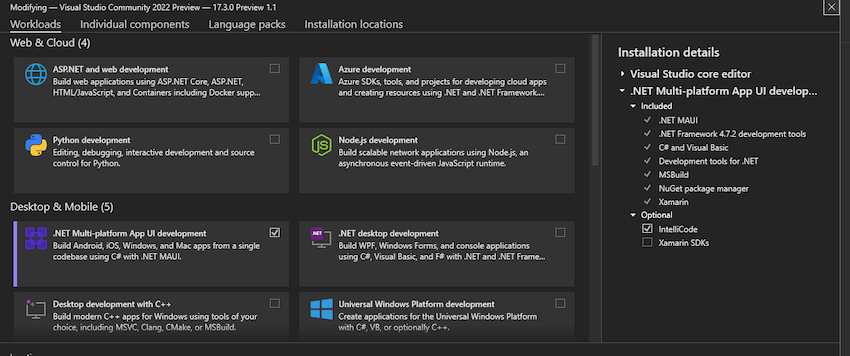
Install Visual Studio 2022 Preview

Only the Visual Studio 2022 Preview offers .NET MAUI right now. Obtain the Visual Studio 2022 Preview by clicking here.

Select .NET Multi-platform App UI Development Workload from the list below once it has been downloaded and installed.

It’s best to restart the computer after a successful installation before starting Visual Studio 2022 Preview.

Making the first.NET MAUI application in the preview of Visual Studio 2022

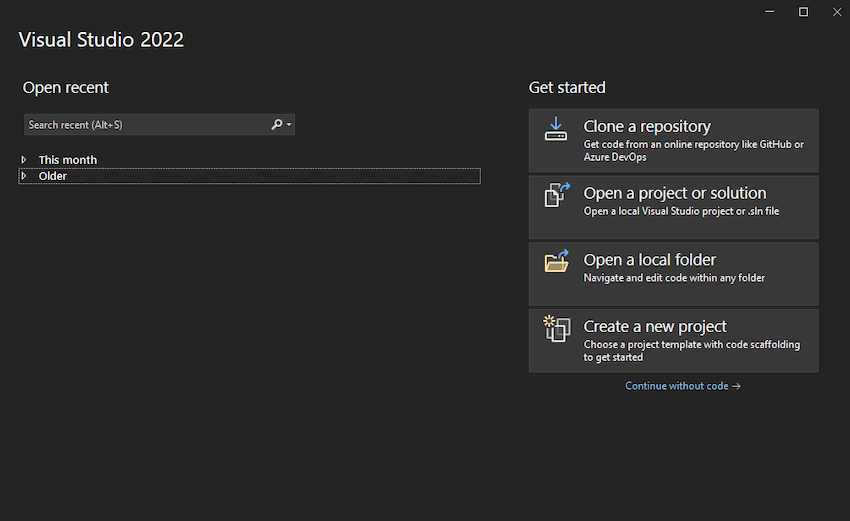
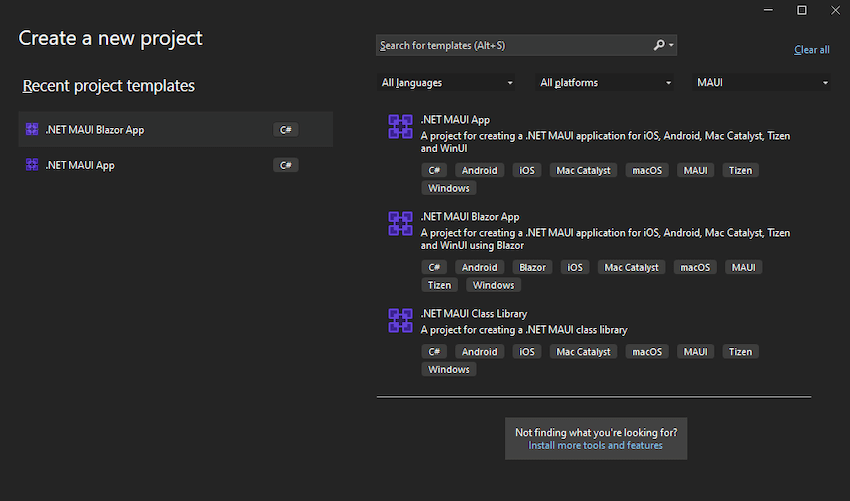
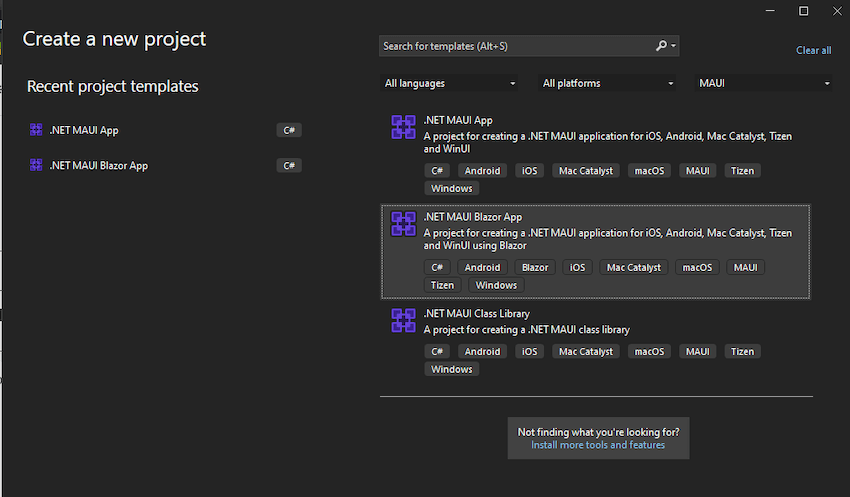
At first, launch the Visual Studio 2022 Preview and Choose to create a new Project and search for MAUI.

.NET MAUI has three categories, .NET MAUI App, .NET MAUI Blazor App, .NET MAUI Class Library.

In upcoming articles, we’ll examine each category in greater detail. The.NET MAUI App currently allows us to create applications from a single code base for Windows, Android, iOS, Mac Catalyst, MAUI, and Tizen.

.NET MAUI Blazor App – These applications are created using Blazor and can run on iOS, Android, Mac Catalyst, Tizen, and WinUI from a single source of code.

Applications can be run on Android, iOS, Mac Catalyst, macOS, Tizen, and Windows thanks to the .NET MAUI Class Library, which was used in their development.

Let’s create our first .NET MAUI App.

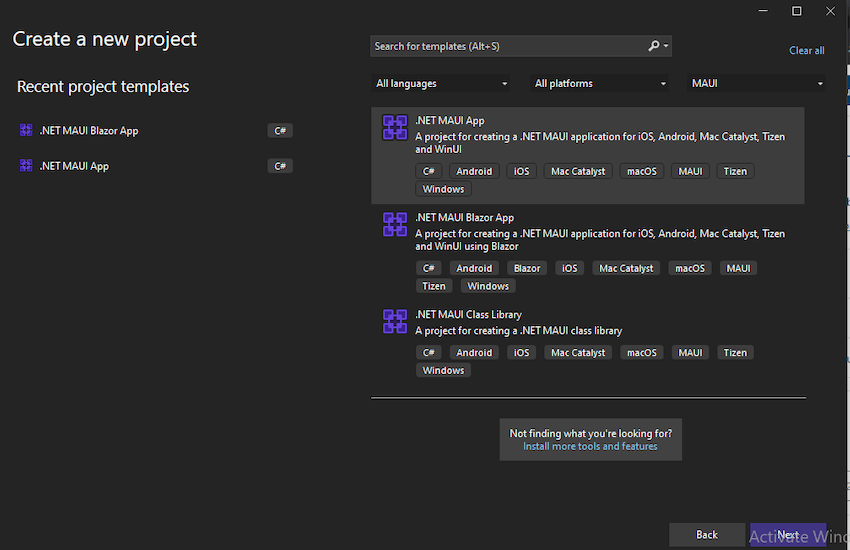
Choose to .NET MAUI App from the Project Template options and click Next.

.NET MAUI

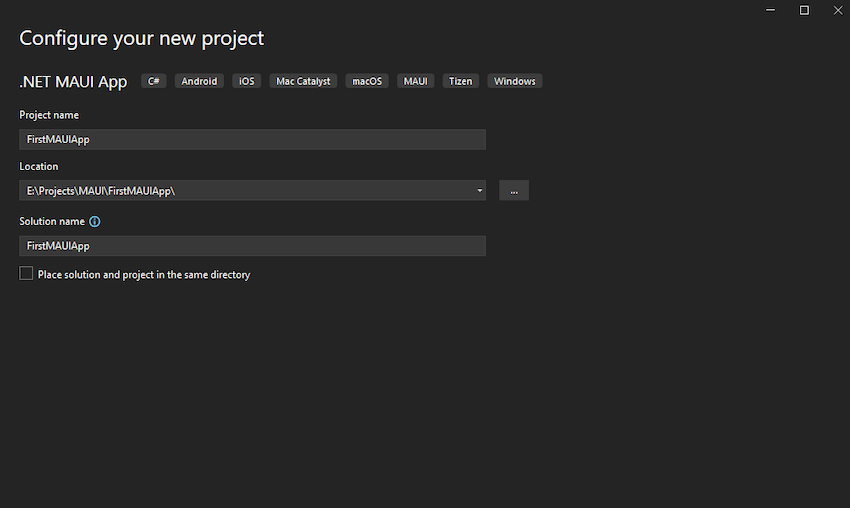
Save it in the location by providing the project name.

.NET MAUI

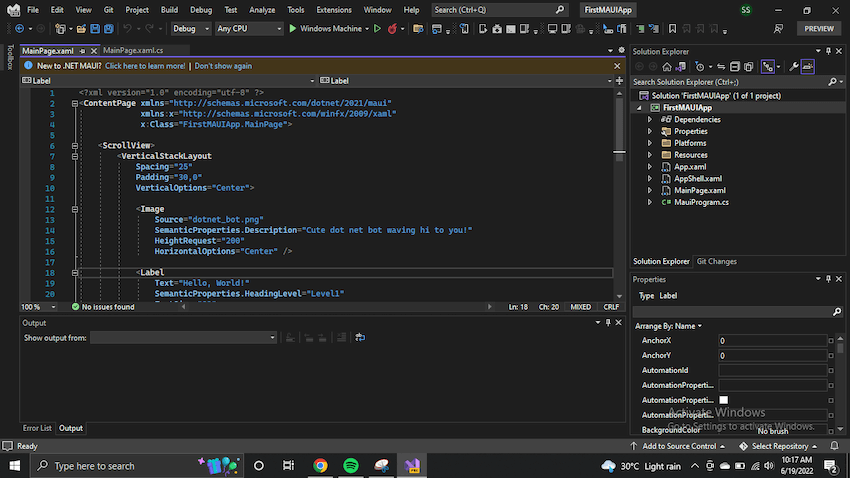
.NET MAUI App uses XAML and is similar to WPF.

.NET MAUI

.NET MAUI Blazor

Now you may ask what is .NET Blazor?

It’s a feature of ASP.NET, the well-known web development framework, is called Blazor. It adds tools and libraries for creating web apps to the.NET developer platform.

Instead of using JavaScript, Blazor enables you to create interactive web user interfaces. Reusable web UI components are implemented in Blazor apps using C#, HTML, and CSS. Because C# is used for both client and server code, you can share code and libraries.

Using WebAssembly, Blazor can execute your client-side C# code right in the browser. You are able to reuse the code and libraries from the server-side components of your application because real.NET is running on WebAssembly.

You could also have Blazor execute your client logic on the server. Using SignalR, a real-time messaging framework, client UI events are returned to the server. The necessary UI changes are sent to the client and merged into the DOM once execution is finished.

In today’s discussion let’s use blazor to export multiple platforms

Using Blazor, we can easily export applications for Multiple Platforms.

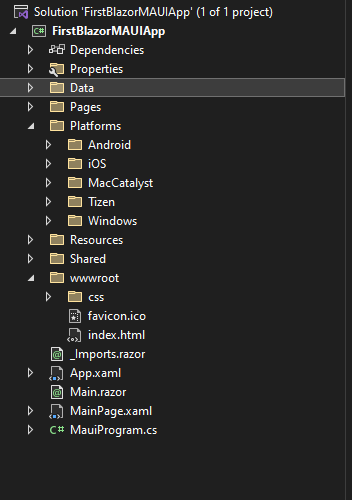
Choose .NET MAUI Blazor from the Project Template while creating a new project and save it.

The default project folder structure is shown in the image below. It will be very simple for you to do this if you are already familiar with Blazor.

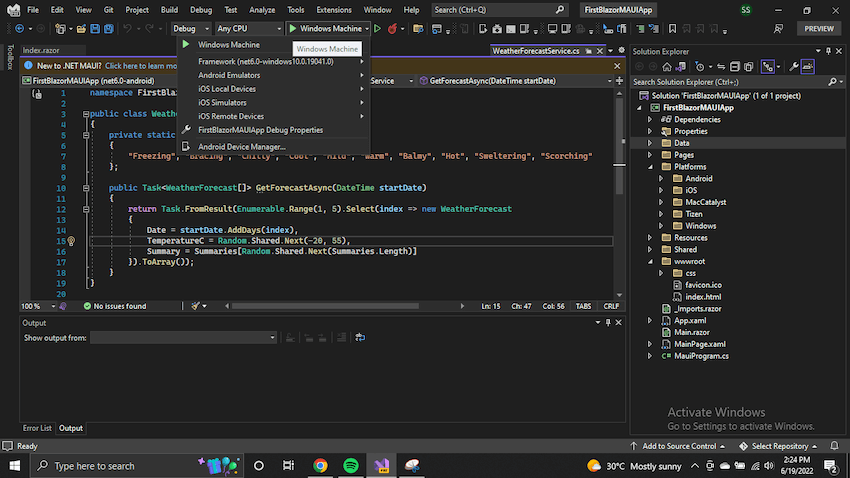
Similar options for exporting the application to various platforms are available for this project as they are for the.NET MAUI App. Let’s test the program on various platforms.

This project also has similar options to the .NET MAUI App to export the application to Mac, android or iOS platforms. But we will cover that in another article.

Conclusion

This article covered the creation of .NET MAUI applications and how to debug them across various platforms. The debugging for Windows devices, and procedure to create application in Mac, android and iOS devices have not been covered; they will be in subsequent articles later. But we hope that this article will help you to go through with everything related to MAUI if you are new here. Please feel free to share your feedback with us.

Reasons To Choose Azure Over AWS

No Comments »

It’s not too long ago that the conversation around cloud services was, “they’re coming, so get ready.”

Today, clouds are normal, and we use it in our personal lives and in business. In fact, it’s predicted that spending on cloud services will more than double from $229 billion in 2019 to around $500 billion by 2023. Well, there are three major players in the cloud services world: AWS (Amazon Web Services), Google Cloud Platform (Google’s offering) and Microsoft Azure. We will be talking about AWS and Azure only. Although AWS is the public cloud market share leader, Azure is making gains and is the perfect choice for larger organisations already using Microsoft products.

Let’s take a look at some of the reasons why Microsoft Azure is better than AWS. But first let’s see…

What is AZURE?

Microsoft Azure, often referred to as Azure, is a cloud computing service operated by Microsoft for application management via Microsoft-managed data centers. Azure was launched in 2010 and it emerges as one of the biggest commercial cloud service providers. It offers a wide range of integrated cloud services and functionalities such as analytics, computing, networking, database, storage, mobile and web applications that seamlessly integrate with your environment in order to achieve efficiency and scalability.

What is AWS?

Amazon Web Services, Inc. is a subsidiary of Amazon that provides on-demand cloud computing platforms and APIs to individuals, companies, and governments, on a metered pay-as-you-go basis. AWS services are designed in such a way that they work with each other and produce a scalable and efficient outcome. AWS offering services are categorized into 3 types such as Infrastructure as a service (IaaS), software as a service (SaaS) and platform as a service (PaaS). AWS was launched in 2006 and became the best cloud platform among currently available cloud platforms. Cloud platforms offer various advantages such as management overhead reduction, cost minimization, etc.

Key Differences

Value and Cost-effectiveness

Azure is a natural choice for thousands of organisations that are already Microsoft houses. Most enterprise-level companies already use and are familiar with the Microsoft suite, and generally have an Enterprise Agreement in place. When this is the case, Azure offers cost-savings compared to AWS through discounts on licensing for Azure. You can also use your existing Windows Server and SQL Server licences with Software Assurance to pay a reduced rate when moving to Azure. It also allows companies to get more value from their existing Microsoft investment through full integration with Office 365 and Active Directory. For companies moving their Windows Server to the cloud, Microsoft has offers such as extended security updates included in the cost.

AWS follows pay as you go and they charge per hour whereas Azure also follows pay as you go model and they charge per minute which provides more exact pricing model than AWS.

PaaS Capabilities

Both Azure and AWS offer similar IaaS capabilities for virtual machines, networking, and storage. However, Azure provides stronger PaaS capabilities which is an important piece of Cloud infrastructure today.

Microsoft Azure PaaS provides application developers with the environment, tools, and building blocks that they need to rapidly build and deploy new cloud services. It also provides the vital ‘dev-ops’ connections which are important for monitoring, managing, and continually fine tuning those apps. With Azure PaaS, much of the infrastructure management is taken care of behind the scenes by Microsoft. Thus, Azure development allows for a 100% focus on innovation.

Security

From a security perspective, Microsoft is for industry-leading security than the Amazon. They were recognised as a Leader in security. Microsoft’s security is so robust it’s trusted by government bodies as well as enterprises; 95% of fortune 500 companies use Azure. 8 trillion threat signals are analysed by Microsoft every day, with more than $1 billion dollars spent each year on security research and development. Azure also provides more than 90 compliance offerings and is the most trusted cloud by US government agencies.

.Net Compatibility

Azure’s compatibility with the .Net programming language is one of the most useful benefits of Azure, which gives Microsoft a clear upper hand over AWS and the rest of the competitors. Azure has been built and optimized to work consistently with both old and new applications developed using the .Net programming framework. It is much easier and straightforward for enterprises to move their Windows apps to Azure Cloud as opposed to AWS or others. Thus for the several organizations that use .Net based enterprise apps, Azure is the obvious choice.

Cloud Connectivity & Performance

While Amazon is still testing the hybrid waters, Azure already has its hybrid capabilities in place. It seamlessly connects datacenters to the Cloud. Azure provides a consistent platform which facilities easy mobility between on-premises and the public Cloud.

Unlike AWS, hybrid apps can be developed on Azure which can take advantage of the resources available within datacenters, at the service provider’s end, or within Azure itself. Azure also provides a broader range of hybrid connections including virtual private networks (VPNs), caches, content delivery networks (CDNs), and ExpressRoute connections to improve usability and performance.

Conclusion

After this overview of the Differences Between AWS vs AZURE cloud providers, hope you will have a better understanding of the services offered by these AWS vs AZURE providers and choose a cloud provider based on your requirements. If you are looking for Infrastructure as a service or wide range of service and tools then you can choose AWS. If you are looking for windows integration or a good platform as a service (PaaS) cloud provider then you can choose Azure. The choise is always your to make.

Improve Your Model’s Performance and Accuracy with ML.NET’s New Update

No Comments »

Automated Machine Learning (AutoML) is one of the fascinating subfields of Data Science right now. It sounds fantastic for those who are unfamiliar with machine learning, but it concerns present Data Scientists a lot. The media presentation of AutoML suggests that the technology has the potential to drastically transform the way we produce models by removing the need for Data Scientists. In principle, utilizing AutoML to automate the process entirely is a brilliant idea, but it introduces several opportunities for bias and misunderstanding in practice. Machine learning model training can be a time-consuming process. Automated Machine Learning (AutoML) makes identifying the best strategy for your circumstance and dataset easier.

ML.NET is an open-source, cross-platform machine learning framework for .NET developers that allows custom machine learning to be integrated into .NET applications. Microsoft changed the AutoML implementation in its Model Builder and ML.NET CLI tools based on Microsoft Research’s Neural Network Intelligence (NNI) and Fast and Lightweight AutoML (FLAML) technology last year.

New AutoML Updates

Training machine learning models is a time-consuming and iterative task. Automated Machine Learning (AutoML) automates that process by making it easier to find the best algorithm for your scenario and dataset. AutoML is the backend that powers the training experiences in Model Builder and the ML.NET CLI. Last year we announced updates to the AutoML implementation in our Model Builder and ML.NET CLI tools based Neural Network Intelligence (NNI) and Fast and Lightweight AutoML (FLAML) technologies from Microsoft Research. These updates provided a few benefits and improvements over the previous solution which include:

  • Increase in the number of models explored.
  • Improved time-out error rate.
  • Improved performance metrics (for example, accuracy and R-squared).

The Experiment API

An experiment is a collection of training runs or trials. Each trial produces information about itself such as:

Evaluation metrics: The metrics used to assess the predictive capabilities of a model.

Pipeline: The algorithm and hyperparameters used to train a model.The experiment API includes a set of AutoML defaults, making it easier to add to a training pipeline. The dataPrepPipeline in this code snippet is a sequence of transforms to get the data into the proper format for training. The AutoML components required to train a regression model are added to that pipeline.

The same idea holds for other supported cases, such as categorization. When building an experiment using the training pipeline, one may choose the length of the training, the training and validation sets, and the evaluation measure they are optimizing. After setting up the pipeline and experiment, call the Run function to begin training.

// Configure AutoML pipeline
var experimentPipeline =    
    dataPrepPipeline
        .Append(mlContext.Auto().Regression(labelColumnName: "fare_amount"));

// Configure experiment
var experiment = mlContext.Auto().CreateExperiment()
                   .SetPipeline(experimentPipeline)
                   .SetTrainingTimeInSeconds(50)
                   .SetDataset(trainTestSplit.TrainSet, validateTestSplit.TrainSet)
                   .SetEvaluateMetric(RegressionMetric.RSquared, "fare_amount", "Score");

// Run experiment
var result = await experiment.Run();

In this code snippet, the dataPrepPipeline is the series of transforms to get the data into the right format for training. The AutoML components to train a regression model are appended onto that pipeline. The same concept applies for other supported scenarios like classification.

What’s next for ML.NET?

We’re actively working towards the areas outlined in our roadmap.

Deep Learning

A few months ago we shared our plan for deep learning. A significant portion of that plan revolves around improving ONNX experiences for consumption and enabling new scenarios through TorchSharp, A .NET library that provides access to the library that powers PyTorch. Some of the progress we’ve made towards this plan includes:

Enabled global GPU flags for ONNX inferencing. Prior to this update, when you wanted to use the GPU for inferencing with ONNX models, the FallbackToCpu and GpuDeviceId flags in the ApplyOnnxModel transform were not saved as part of the pipeline. As a result, you had to fit the pipeline every time. We’ve made these flags accessible as part of the MLContext so you can save them as part of your model.

TorchSharp targets .NET Standard. TorchSharp originally targeted .NET 5. As part of our work in enabling TorchSharp integrations into ML.NET, we’ve updated TorchSharp to target .NET Standard.

We’re excited to share with you the progress we’ve made integrating TorchSharp with ML.NET in the coming weeks. Stay tuned for the blog post.

.NET DataFrame

Clean and representative data improves the performance of the model. As a result, data analysis, cleansing, and preparation for training is a crucial stage in the machine learning workflow. A few years back, we introduced the DataFrame type to.NET as a preview in Microsoft.Data.Analysis NuGet package. The DataFrame is still in preview. as it is very important for someone to have the tools to perform data cleaning and processing tasks and have started to organize and prioritize feedback, they address existing stability and developer experience pain points. The feedback is being organized as part of a GitHub issue.

MLOps

Machine Learning Operations (MLOps) is like DevOps for the machine learning lifecycle. This includes things like model deployment & management and data tracking, which help with productionizing machine learning models. We’re constantly evaluating ways to improve this experience with ML.NET.

Recently we published a blog post that guides you through the process of setting up Azure Machine Learning Datasets, training an ML.NET model using the ML.NET CLI and configuring a retraining pipeline with Azure Devops. For more details, check out the post Train an ML.NET model in Azure ML.

Conclusion

Machine Learning Operations (MLOps) is a machine learning lifecycle equivalent to DevOps. It comprises features such as model deployment and administration and data tracking, which aids in producing machine learning models. Microsoft continually strives for ways to improve the ML .NET experience. These are some updates brought in by Microsoft ib their ML .NET framework, which will help developers better their workflow.

« go backkeep looking »